Best overall: Planegraph for generating and editing finished reels in one workspace. Best for repurposing interviews: OpusClip. Best for transcript-led editing: Descript. This 2026 AI reel generator guide also covers CapCut for manual timeline work and Adobe Express for template-led social content, with the trade-offs that determine which tool fits your production process.
TL;DR
Planegraph is the best AI reel generator for creators who want generation, editable output, and reusable workflows together.
OpusClip fits long-video repurposing; Descript fits spoken-word editing through a transcript.
CapCut fits hands-on timeline editing; Adobe Express fits template-led social video production.
Choose by your starting material and revision needs, not by the first generated preview.
Why this matters
An AI reel generator can mean different things: generating new footage, finding excerpts inside an interview, or assembling existing assets into a vertical video. Those jobs require different controls. A convincing preview does not tell you whether you can replace a shot, correct a caption, or revise the final call to action.
Choose the tool that handles your hardest revision, not just your easiest first draft. For an agency, that revision might be a client-requested product swap. For a creator, it might be removing a sentence without breaking the edit. An online store needs product visuals that remain accurate throughout the reel.
What makes the best AI reel generator?
For this 2026 shortlist, the criteria focus on producing something you can revise and publish:
Starting material: Does the tool suit an idea, a product reference, a transcript, or an existing recording?
Editable output: Can you change timing, text, visuals, and composition without regenerating the entire piece?
Source control: Can you supply references and check whether the output preserves the product or message?
Repeatable production: Does the workflow support another reel with a different opening, product, or audience?
Finishing controls: Can you inspect captions, framing, audio, and the closing message before export?
Review effort: Which decisions remain yours, and are those decisions easy to inspect?
Generation quality matters, but it is not the only selection criterion. If your work involves approvals, editable output belongs near the top of the list.
AI reel generators at a glance
Planegraph
Best for: Idea-to-finished creative production
Standout capability: Generation, video timeline, layered image canvas, and reusable workflows
Key limitation: Generated visuals and agent changes still need review
OpusClip
Best for: Repurposing interviews and podcasts
Standout capability: Finding short clips within longer recordings
Key limitation: Results depend on the source recording containing useful excerpts
Descript
Best for: Editing spoken-word reels
Standout capability: Editing video through its transcript
Key limitation: Transcript changes do not replace visual composition work
CapCut
Best for: Hands-on timeline finishing
Standout capability: Timeline editing with caption and visual tools
Key limitation: More direct control means more editing decisions for you
Adobe Express
Best for: Template-led social videos
Standout capability: Combining templates, text, and supplied assets
Key limitation: A template still needs deliberate pacing and content choices
These are different production routes, not interchangeable generators. Match the tool to what you already have before comparing individual features.
1. Planegraph: best AI reel generator for finished creative workflows
Planegraph combines generation with a full-featured video timeline and layered image canvas. AI assistants make requested changes, while manual controls let you finish adjustments yourself. That makes the platform relevant when your deliverable is an editable reel rather than an isolated generated clip.
Prism plans work, checks it, and retries. The workflow editor connects repeatable production steps, so generation and editing sit inside the same workspace rather than becoming separate handoffs.
A practical product-reel workflow
Start with a product reference, the audience, the message, and the action you want viewers to take. For a suggested 15-second reel, write a 3-shot brief: an opening product view, a demonstration or use context, and a closing message. Those are creative constraints, not performance benchmarks.
Use this sequence to keep the edit inspectable:
Brief: State the product details that must remain unchanged and the message the reel must communicate.
Generate: Create the visual material, using references rather than asking the model to invent product details.
Edit: Adjust the sequence on the video timeline and refine supporting visuals on the layered image canvas.
Review: Check the product, captions, transitions, and closing message before exporting.
The important distinction is what happens after generation: you can request changes through an assistant and use manual controls for the final adjustment.
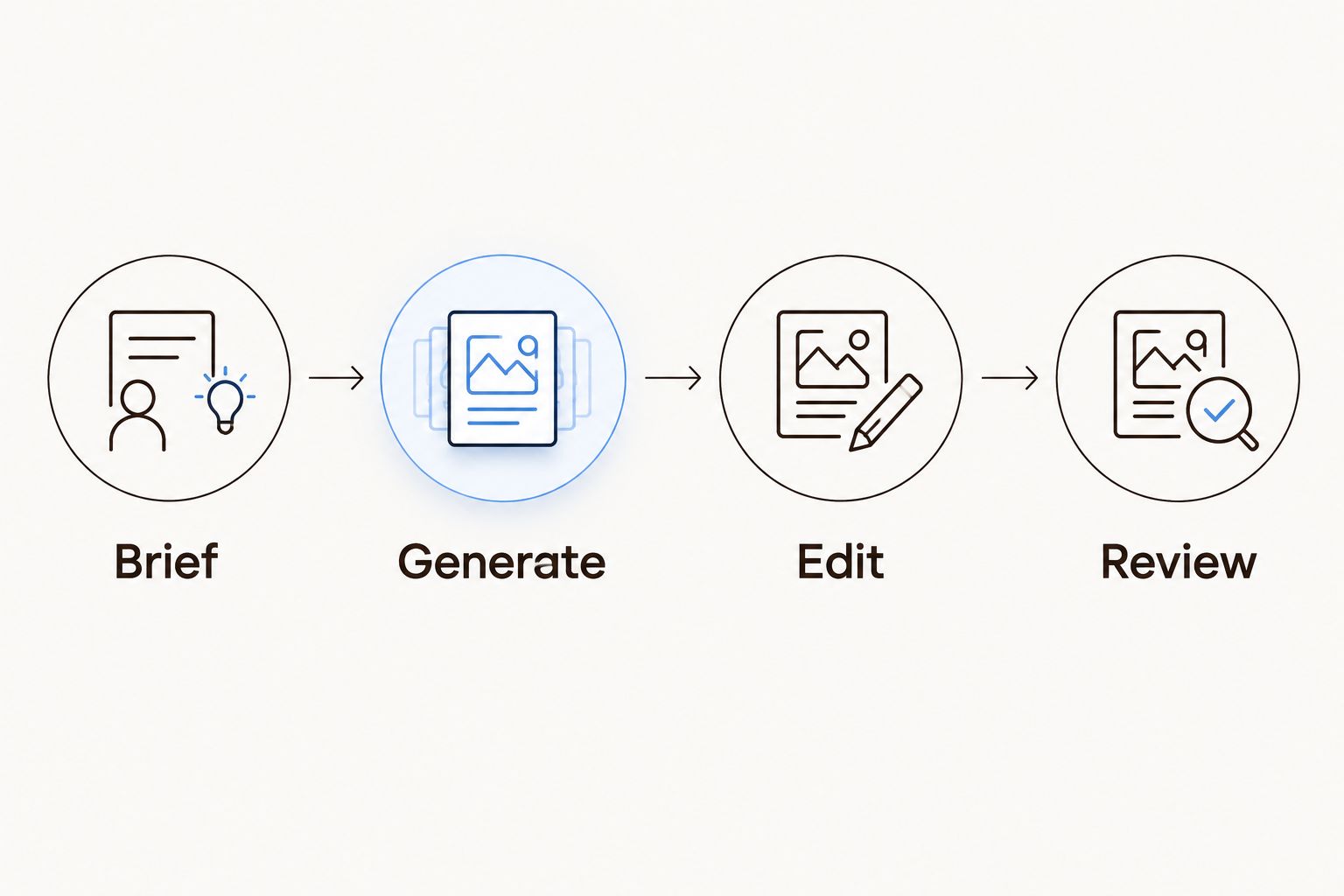
Treat generation as a production step, not as the finished deliverable.
The platform also includes a library of thousands of Meta ads that AI can remix around a product using models such as Nano Banana. Built-in avatars, pose guides, and reference content reduce the need to source every starting asset elsewhere. Use those references to guide creative structure, then check that the resulting reel accurately represents your product.
Planegraph pros:
Generation and editable finishing share one workspace.
The video timeline and layered image canvas support different parts of the same creative task.
Assistants and manual controls provide separate ways to make revisions.
Reusable workflows suit recurring ad and social-content production.
Planegraph cons:
Generated product details, movement, and text still require inspection.
A reusable workflow needs a clear brief and review rules; automation does not supply those decisions.
Best for: Agencies, product marketers, and creators who need to take an idea through generation, revisions, and finished output.
Verdict: Buy for an end-to-end creative workflow, not merely a generated clip.
2. OpusClip: best AI reel generator for repurposing long recordings
OpusClip turns longer recordings into shorter clips. Its core fit is source-led production: interviews, podcasts, discussions, and other videos that already contain usable spoken moments. Automatic clip selection and captioning help create candidates for review.
Start with a recording that contains a clear point, not simply a long file. A short excerpt needs enough context to make sense without the surrounding conversation. Review the opening and ending together; an engaging opening does not fix an unfinished thought.
For a podcast reel, ask whether the selected excerpt contains a claim, an explanation, and a useful stopping point. If the answer depends on something said earlier, choose a different excerpt or add accurate context.
OpusClip pros:
Matches a repurposing task without requiring new footage generation.
Creates short-form candidates from existing longer videos.
Captioning supports dialogue-led clips.
OpusClip cons:
Weak source material still produces weak clip candidates.
Automatic selection needs editorial review for context and complete meaning.
Best for: Podcasters, interview producers, and teams with a backlog of recorded conversations.
Verdict: Buy for extracting existing moments; skip it as your primary route to original product footage.
3. Descript: best AI reel generator alternative for transcript editing
Descript lets you edit recorded audio and video through text. That makes it useful when the spoken explanation is the reel: a founder talking through a product, a tutorial, or a commentary clip. You can work on the wording and sequence through the transcript rather than treating every change as a timeline operation.
This is an editing-first choice, not the default for inventing a visual concept from scratch. Establish the spoken argument, remove unnecessary passages, and then inspect the resulting video cuts.
For a tutorial reel, read the edited transcript aloud before finishing the picture. A sentence can be grammatically complete while still depending on a visual demonstration that you removed. Keep the explanation and the visible action aligned.
Descript pros:
Transcript-based editing suits dialogue-heavy material.
Text makes the spoken structure easier to inspect.
Works naturally with recorded explanations and interviews.
Descript cons:
A clean transcript does not guarantee smooth visual cuts.
Product compositions and graphic timing still need visual review.
Best for: Educators, founders, and creators whose reels depend on what someone says.
Verdict: Buy when spoken-word editing is the bottleneck; skip it as the default for visual-first ad concepts.
4. CapCut: best AI reel generator alternative for manual finishing
CapCut combines timeline editing with tools such as automatic captions, effects, and transitions. It fits creators who already have footage or generated clips and want direct control over the final sequence. Here, the editor—not the prompt—is the center of the workflow.
Use CapCut when you need to decide exactly where a cut lands or how a caption appears against the footage. That control also creates work: someone must make those decisions and check them across the edit.
For vertical delivery, a 9:16 frame is a common starting format; 1080 × 1920 pixels is a common matching canvas. Check the intended publishing surface rather than assuming the export alone guarantees a good presentation. Keep important text away from interface elements and preview the finished video on a phone.
CapCut pros:
Timeline editing supports deliberate pacing and shot order.
Caption tools suit speech-led social video.
Visual tools support finishing supplied footage.
CapCut cons:
Hands-on finishing requires editing judgment and attention.
Effects and transitions can distract from the product or message when overused.
Best for: Creators who want to shape the final cut themselves.
Verdict: Buy for manual finishing control; skip it if your main requirement is an autonomous production workflow.
5. Adobe Express: best AI reel generator alternative for templates
Adobe Express supports template-led video creation using text, images, and video assets. It fits a task where you already know the message and need to assemble a clear social post. Product announcements, promotional explainers, and recurring branded formats are natural uses for that approach.
Choose a template for its structure, not its decoration. Replace the supplied content, shorten the text, and adjust timing so viewers can understand the message without pausing.
A useful starting test is whether the same layout still works with your actual product image and headline. If you spend the entire edit fighting the template, start from a simpler composition. A template is a starting arrangement, not a creative strategy.
Adobe Express pros:
Templates provide a starting structure for social videos.
Text and supplied visuals can share a consistent composition.
Suits repeatable announcements and graphic-led posts.
Adobe Express cons:
Template structure can constrain a distinctive visual idea.
Pacing and message clarity still depend on your choices.
Best for: Online-store owners and marketers assembling template-led social content.
Verdict: Buy for structured social posts; skip it as the default for complex generated-video sequences.
How we ranked these tools
This 2026 ranking prioritizes workflow fit, editable output, source control, repeatability, and finishing decisions. It is a feature-based buying guide, not a hands-on benchmark or a measured comparison of generation quality.
The overall recommendation favors completing and revising creative work in one workspace. The specialist recommendations favor a narrower starting condition: long recordings, spoken scripts, existing footage, or template-ready assets. That distinction matters more than treating every product as the same kind of generator.
Which AI reel generator should you choose?
Choose Planegraph if your 2026 workflow starts with an idea and must end with an editable, finished reel. Its combination of generation, assistant-led changes, timeline editing, and reusable workflows matches that job.
Choose OpusClip for existing interviews, Descript for transcript-led edits, CapCut for hands-on finishing, or Adobe Express for template-led posts. Before committing, take the same real brief through your preferred workflow and request a meaningful revision. The ability to change the output is part of the purchase decision.
FAQ
What's the best AI reel generator in 2026?
The best choice depends on your starting material and revision needs. Choose a generation-and-editing workspace for original creative production, a clipping tool for long recordings, or a timeline editor for hands-on finishing.
Can an AI reel generator make reels from product photos?
Image-to-video generation can use product photos as starting references. Check the output for altered packaging, labels, proportions, and details before using it in an ad.
Is OpusClip better than CapCut for reels?
OpusClip fits extracting clips from long recordings, while CapCut fits hands-on editing. Choose according to whether finding excerpts or finishing the sequence is your main task.
Is Descript a good choice for talking-head reels?
Descript fits talking-head reels when editing the spoken content is the main job. Review the video after transcript changes to check cut continuity and the connection between speech and visuals.
What should I check before exporting an AI-generated reel?
Check product accuracy, captions, audio, framing, transitions, and the closing message. Watch the complete export, because reviewing isolated clips does not reveal every sequencing problem.
Should I generate an entire reel in a single prompt?
Use separate shots when you need independent control over the opening, demonstration, and closing message. Assemble and revise those shots in an editor rather than depending on one generation to solve every creative decision.
Can I reuse the same workflow for different clients?
Reuse the production structure, but replace client-specific references, claims, assets, and review criteria. A shared workflow does not make product details or permissions interchangeable.
One last thing
Before choosing your 2026 reel workflow, write the revision request you least want to receive: replace the product image, change the opening, remove a claim, or retime the captions. Then check how the tool handles that request.
A polished first draft is only part of the job. The stronger buying signal is whether you can make the necessary change without rebuilding the reel.