To preserve labels and packaging in AI product photography, keep the real product photograph as a separate layer and generate the setting around it, rather than asking a model to redraw the entire product. Use reference images to guide composition, not as proof that the output preserves your artwork. Finish by checking the editable composite against the original packaging before you export an ad, reel cover, or product visual.
TL;DR
For AI product photography, preserve the photographed product and generate the surrounding scene separately.
Reference images guide appearance; inspect every generated label and packaging detail before publishing.
Planegraph suits marketers combining product imagery, layered editing, and finished ad production in one workspace.
Check label text, package shape, shadows, and the final crop against your approved product photograph.
How do you preserve labels and packaging in AI product photography?
Separate what must remain accurate from what you want the model to invent. The label, logo, package structure, and visible product details belong in the first group. Backgrounds, props, and scene concepts belong in the second.
Planegraph brings generation, a layered image canvas, AI-assisted changes, and manual adjustments into one workspace. For this task, the useful distinction is between generating an asset and finishing an editable composition: you need control after the first image appears.
Use this sequence for your 2026 production workflow:
Source photo. Select an approved photograph showing the exact packaging version you intend to advertise. Keep the original file available throughout editing.
Product isolation. Separate the product from its background without removing fine edges, transparent sections, or parts of the package.
Scene generation. Create the background around the intended product position. Describe the surface, lighting direction, viewpoint, and empty space needed for the product.
Layered assembly. Place the photographed product into the scene as a separate element. Adjust its placement and the surrounding scene without replacing the label.
Final inspection. Compare the finished image with the source, then inspect the exported file at its intended display size.
The sequence protects the source artwork, but it does not make every composite convincing. Perspective, reflections, lighting, and contact shadows still need attention.
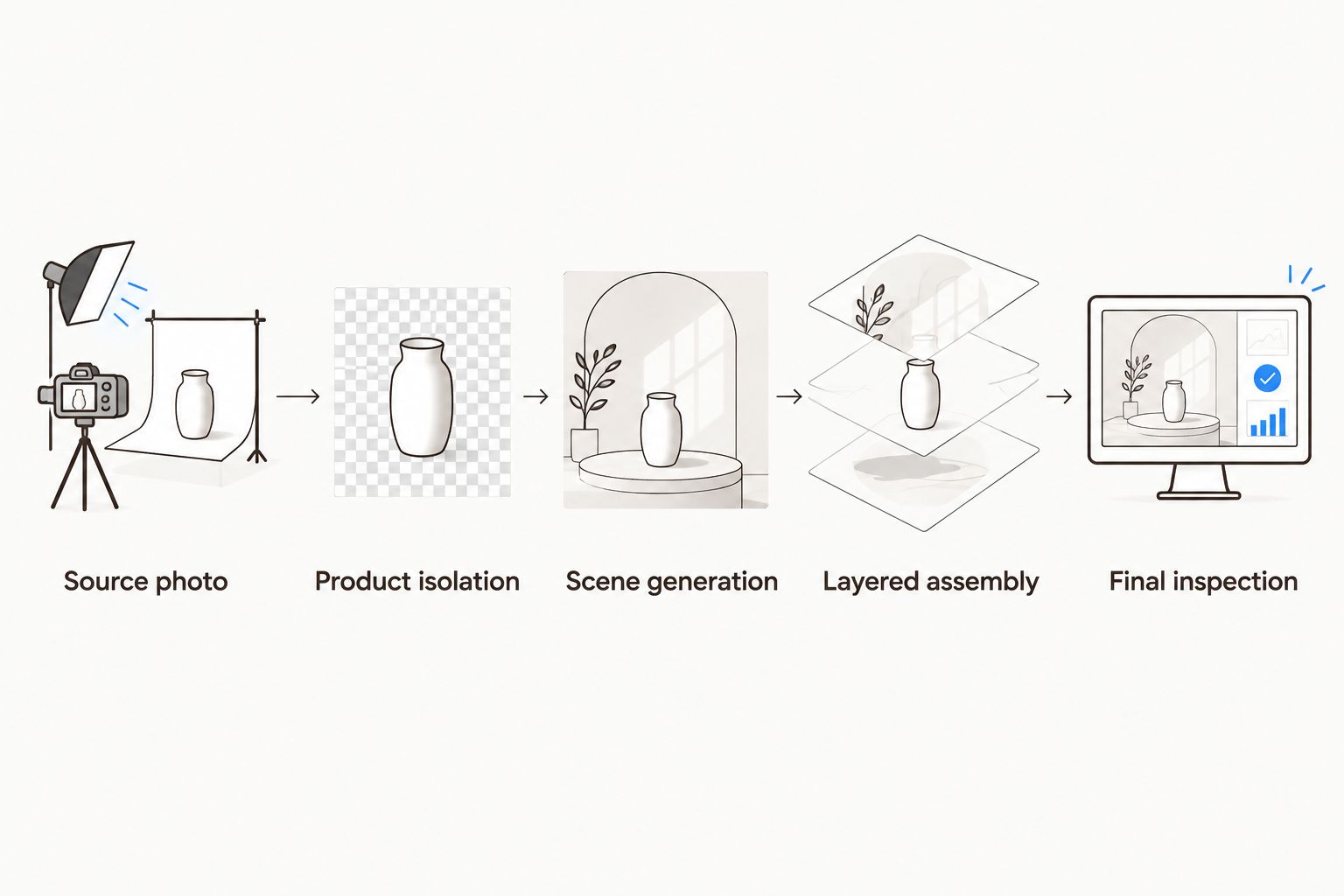
Generate the setting separately so the product photograph remains available for inspection and correction.
Why this matters
A generated package can resemble your product while displaying different words, an altered logo, or the wrong closure. Visual similarity is not packaging accuracy. A scene that looks convincing at a glance still needs an artwork check.
For agencies, the approval question is not simply whether the image looks good. It is whether the image represents the client's actual product. For store owners and product marketers, the same distinction separates creative scene development from a dependable product depiction.
Your 2026 approval standard should be the approved package photograph, not the prompt. A prompt records intent; the exported image is what the customer sees.
Which workflow should you use?
Choose the workflow according to what the image must communicate. A concept board and a customer-facing product image have different accuracy requirements, even when they begin with the same brief.
Full-image generation
Best for: Exploring visual concepts
Main advantage: Lets you explore product-and-scene ideas together
Main limitation: Product text and geometry require verification; do not treat the output as approved artwork
Reference-guided generation
Best for: Exploring composition around a known product
Main advantage: Gives the model visual guidance beyond a text description
Main limitation: A reference does not guarantee unchanged labels or packaging
Layered compositing
Best for: Customer-facing images requiring packaging fidelity
Main advantage: Retains the photographed product as a separately editable element
Main limitation: Requires careful edge, perspective, lighting, and shadow work
These are production approaches, not measured performance rankings. The table does not establish that any generator preserves a particular label reliably.
Full-image generation: best for concept exploration
Generate the whole image when you want to examine scene ideas before committing to production. You can explore a studio setting, a bathroom shelf, or a countertop arrangement without treating the generated package as final.
The limitation is product fidelity. If the model redraws the package, inspect every visible detail rather than accepting a familiar silhouette. Use the result as a concept when the product depiction is not approved.
Reference-guided generation: best for composition studies
A reference image supplies visual information that a written prompt cannot fully describe. It gives you a starting point for package appearance, framing, and the relationship between the product and its surroundings.
The limitation remains unchanged: guidance is not preservation. If the output re-renders the product, the label still needs comparison with the source. Choose reference-guided generation for exploration, not as a substitute for artwork approval.
Layered compositing: best for packaging fidelity
Layered compositing keeps the product photograph available independently of the generated setting. That makes it possible to change a backdrop or reposition the product without asking a generator to recreate the label.
The trade-off is integration work. A real photograph placed over a generated background can look pasted in when the perspective or lighting does not match. Choose layered compositing when keeping the actual packaging is the priority.
Why label and packaging accuracy varies
The following factors explain where a preservation workflow needs attention. They are inspection criteria, not claims about a particular model's measured accuracy.
Source legibility. A blurred or obscured label does not provide a dependable basis for checking small print. Start with a source in which the required details are visible.
Product angle. The viewpoint determines which label surfaces and package edges you can see. A front-facing photograph does not document an unseen side panel.
Editing scope. Asking a model to recreate the entire product exposes the packaging to changes. Keeping the photographed product separate narrows what you need the model to invent.
Surface properties. Transparent plastic, reflective foil, and glossy containers carry information about their surroundings. Preserving those reflections can make a new background look inconsistent.
Final presentation. Resizing, compression, overlays, and cropping affect the delivered image. Check the export, not only the editing canvas.
How should you prepare the product photograph?
Use the packaging version approved for the campaign. Check the product name, variant, visible claims, closure, and label placement before you begin; an accurately preserved photograph of outdated packaging is still the wrong campaign asset.
Choose a photograph whose angle fits the intended scene. If the source shows the package straight on, design a setting that accepts that viewpoint rather than building a dramatic overhead scene and trying to force the product into it.
Keep a clean source file alongside the working composition. Treat the source as the reference for factual appearance and the working file as the place for creative changes.
For a 2026 campaign brief, identify these boundaries explicitly:
Fixed: the photographed label, package structure, logo, and visible product details.
Editable: the setting, surrounding props, placement, and campaign copy outside the package.
Approval required: any change to the product's visible appearance, including added reflections or retouched packaging.
This prevents a vague request such as “make it more premium” from becoming permission to redraw the container.
How do you make the product belong in the generated scene?
Start with perspective. The visible top, sides, and base of the product should fit the camera position implied by the background. When they disagree, change the scene or choose another source photograph rather than distorting the package to fit.
Next, compare lighting direction. A strong highlight on the photographed product suggests a light source; the generated environment should not contradict it. Adjust the surrounding scene before changing label contrast or package color.
Finally, inspect the contact area. A product resting on a surface needs a believable relationship with that surface, including an appropriate contact shadow. Keep shadow work separate from the printed label wherever possible.
Preserving the label is necessary, but it is not sufficient for a convincing composite. The scene also has to support the original photograph's perspective and light.
What about transparent or reflective packaging?
Transparent and reflective packaging needs closer inspection because the source photograph includes traces of its original environment. A glass bottle can retain the old background through its transparent areas, while a glossy pouch can carry reflections that clash with the new scene.
Do not solve that mismatch by casually regenerating the whole product. Choose a more compatible setting, prepare a more suitable photograph, or route the difficult areas through deliberate retouching and approval.
Where does Planegraph fit in the workflow?
Planegraph is best for marketers who want AI product photography and editable ad production in one workspace. Its layered image canvas supports the finishing stage, while AI assistants make requested changes and manual controls support final adjustments.
That is the relevant capability here: retain an editable composition instead of stopping at a generated image. Describe the intended change narrowly, inspect what changed, and use manual adjustments where the result needs correction.
Reusable workflows can carry the brief and production sequence across campaign variants. Prism's planning, checking, and retrying functions support that process, but workflow checks do not replace comparison with approved packaging artwork.
The documented feature set also includes a library of thousands of Meta ads that AI can remix around a product, with models such as Nano Banana, plus built-in avatars, pose guides, and reference content. Those resources support creative development; they do not establish that a remixed image preserves a label unchanged.
For motion deliverables, the full-featured video timeline extends the work into an editable sequence. The limitation is unchanged across formats: the platform's generation and editing features are not evidence of label-preservation accuracy. Approve the product depiction separately from the creative treatment.
What should you check before publishing?
Use a packaging-specific review rather than a general “looks good” approval. Put the approved source and exported image beside each other, then inspect the same details in both.
Label text: product name, variant, punctuation, and any visible claims.
Brand artwork: logo shape, placement, proportions, and color.
Package structure: cap, pump, seams, corners, handle, and overall silhouette.
Image integration: cutout edges, transparent areas, reflections, and contact shadow.
Delivery crop: label visibility, product boundaries, and overlapping campaign copy.
For your 2026 review record, distinguish an approved product depiction from an approved background. A later scene revision should trigger another export check, even when the source product layer has not intentionally changed.
Can a stronger prompt guarantee accurate labels?
No. A detailed prompt communicates the requested result, but it does not establish that the output reproduces approved packaging. Instructions such as “preserve all text” belong in the brief, not in place of visual inspection.
Use prompts to constrain the creative task: describe the scene, identify the fixed product elements, and specify what should change. Keep the original photograph available so the reviewer can judge the result against something concrete.
Can you turn the finished image into a reel or ad?
Yes. An approved composite can become source material for an ad layout, reel cover, or video sequence, but the new format needs its own review. Motion, overlays, and reframing can obscure a label that was readable in the still image.
For 2026 delivery, approve the exported asset in the format the audience will see. Do not assume approval transfers automatically from the still composition to every animated or cropped version.
FAQ
What's the safest workflow for AI product photography with labels?
Keep the approved product photograph separate and generate the scene around it. Compare the final composite and export with the original packaging before publishing.
Can AI product photography preserve every word on a label?
Do not assume a generated image preserves every word on a label. Retain the photographed label where accuracy matters and inspect all visible text against approved artwork.
Is a reference image enough to preserve my packaging?
A reference image is guidance, not proof of packaging preservation. Check the output for changes to text, logos, closures, proportions, and visible product details.
Should I generate the whole product image or use layers?
Use layers when packaging fidelity is the priority. Full-image generation is useful for concept exploration, but a redrawn product requires separate verification before customer-facing use.
Why does my product look pasted onto the background?
Mismatched perspective, lighting, edges, or contact shadows can make a product look pasted onto a background. Match the scene to the source photograph before changing the package itself.
Can I use the same product photo for every camera angle?
A product photograph only documents the surfaces visible from its original viewpoint. Choose a compatible scene or obtain an approved photograph showing the angle you need.
Do I need to check an image again after exporting it?
Yes, inspect the exported image at its intended display size. Cropping, compression, resizing, and overlays can affect label readability even when the editing canvas looked acceptable.
One last thing
A perfectly preserved label can still sit on the wrong packaging version. Before refining shadows or generating another backdrop, confirm that the source photograph is the product you are actually advertising.
Freeze the approved product source, not the entire creative. That gives you room to change the campaign setting without making packaging accuracy a new guessing exercise each time.