Fashion-brand AI reel generation is the creation of short product videos from prompts, references, and footage with the aim of showing styling clearly enough to support a purchase decision. Your AI reel generator workflow needs to take an idea through generation to editable finished output while preserving garment details, outfit continuity, and control over the final cut.
TL;DR
Planegraph is best for fashion teams that need reel generation and editable finishing in one workspace.
Choose an ai reel generator around garment fidelity, styling continuity, and editable output—not the first attractive render.
Use product photography as the reference for color, construction, and fit; reject generated details that contradict it.
Build fashion reels from approved shots, then use timeline editing to control pacing, captions, and the closing frame.
Why AI reel generation matters for fashion brands
A fashion reel communicates both a visual idea and information about a real garment. A convincing scene still fails as product content when the jacket gains a pocket, the hem changes between shots, or the fabric moves unlike the photographed material.
For your 2026 workflow, separate creative variation from product accuracy. Backgrounds, framing, and transitions can vary; the garment details you sell should not. Approve the product depiction before judging whether the reel feels finished.
Planegraph combines generation with a full-featured video timeline and layered image canvas. That makes it relevant when your team needs to revise a generated asset rather than treat every correction as another generation request. Editable output supports correction; it does not guarantee garment accuracy.
Build a fashion reel workflow in 2026
1. Assemble a garment reference pack
Start manually with your existing product photographs, approved campaign footage, and garment notes. Choose references that explain the item rather than merely establish a mood. A front-facing image can show silhouette while leaving the back fastening, side seam, and fabric texture unresolved.
Keep creative inspiration separate from product evidence. A mood image can guide lighting, but it should not become the authority for sleeve shape or styling accessories. Give each reference a clear role so a reviewer knows which image settles a disagreement.
For a structured starting point, use the AI product image generator reference photo checklist. Then turn your selected material into a shared reference pack that follows the reel through generation and review.
Include clear front, back, and detail photographs where those views matter.
Identify the exact garment and colorway shown in each reference.
Record construction details that must remain unchanged.
Separate lighting references from product references.
Remove images that show conflicting accessories or styling.
2. Lock the styling before generating motion
Write a styling sheet in a shared document before opening a generator. Specify the garment, visible layers, footwear, accessories, hair placement, and background. Describe the intended styling without adding unsupported claims about the material or fit.
Distinguish fixed details from creative choices. A belt threaded through the garment belongs in the fixed group if it appears throughout the reel. Background shadow direction can remain flexible unless it creates an obvious mismatch between adjacent shots.
Keep the outfit fixed while testing the camera treatment. Changing styling and camera movement together makes it harder to identify why a shot no longer matches. For agency work, have the client approve the styling sheet before reviewing motion concepts; otherwise, visual feedback can conceal an unresolved wardrobe decision.
Name the garment details that cannot change.
Specify whether the garment is tucked, open, fastened, or layered.
Fix visible accessories and their placement.
Record the intended hair position around collars and shoulders.
Separate approved styling from optional creative treatments.
3. Plan shots around what the garment must show
Sketch the sequence manually before generating clips. A useful starting exercise is a 3-shot reel: silhouette, construction detail, and a closing product view. This is a planning constraint, not a claim about the best-performing reel length.
Use a simple sequence: Reference pack, Shot plan, Generate, Check, Retry, Finish. A failed check sends the shot back for a specific correction; it should not reset approved styling decisions.
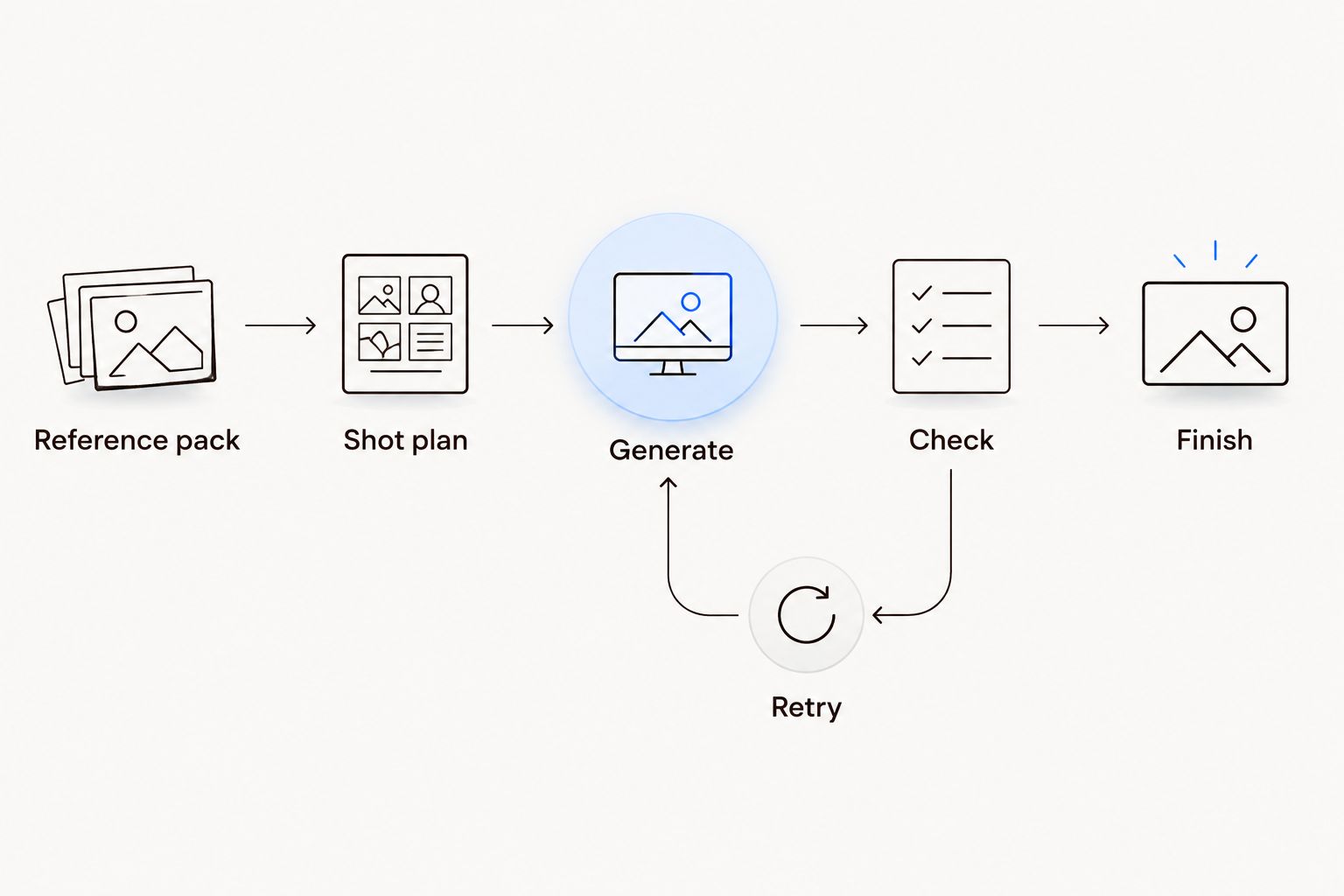
Retry the failed shot without reopening approved styling decisions.
Planegraph's Prism plans, checks, and retries work within the production workflow. Give that process explicit acceptance criteria: which detail must remain visible, what movement is requested, and what counts as a failed depiction. An automated check does not replace approval against the product reference.
Give each shot one visual purpose.
Specify framing and camera movement separately.
Identify the garment detail that must remain readable.
Record a concrete rejection condition for each shot.
Keep an approved shot unchanged while revising another.
4. Generate restrained motion and inspect continuity
Start with the simplest movement that communicates the product. Review the result manually against the reference pack before adding a more complicated turn, walking sequence, or transition. More motion creates more material to inspect; it does not establish that the garment is represented correctly.
Describe visible actions instead of asking for a vague fashion-film treatment. For example: maintain the jacket's fastening and pocket placement while the subject turns slightly toward the camera. That instruction identifies both the requested change and the details that should remain fixed.
Inspect the opening, middle, and closing frames, then watch the full clip. A correct opening frame does not validate the movement between frames. If the product changes shape during an action, reject the affected shot rather than using a transition to hide the error.
Compare garment color against the approved reference.
Check seams, pockets, fastenings, and printed details.
Inspect hands where they touch fabric or accessories.
Watch for changes in hem length and sleeve shape.
Reject movement that changes the apparent construction.
5. Finish the reel on an editable timeline
Assemble the approved clips manually in a timeline before requesting additional generation. Trim dead space, place the strongest product view deliberately, and add text only where it helps the viewer understand the item. Editing solves sequencing problems that another render does not.
Planegraph provides a full-featured video timeline and layered image canvas, with AI assistants for requested changes and manual controls for final adjustments. Use the timeline for the cut and the canvas for image composition. Keep product-reference review separate from both tasks.
For a vertical draft, you can set a 9:16 composition at 1080 × 1920 pixels, then check the destination's current requirements before export. Treat those dimensions as your production brief, not a statement about any tool's export limits. Test a 2-second opening product view as an editorial choice, then judge whether the garment is actually readable.
Trim clips around the useful product movement.
Keep captions away from defining garment details.
Check text contrast against every changing background.
Compare adjacent shots for styling and color continuity.
Review the closing frame without playback controls covering it.
6. Adapt the approved reel into ad variations
Start manually by duplicating the approved edit and changing one creative element at a time. Try a different opening view, a different product-detail emphasis, or a different closing instruction. Keep the underlying garment depiction fixed so feedback concerns the creative treatment rather than a newly introduced product error.
The platform's ad-making tools include a library of thousands of Meta ads that AI can remix around a product, with image-generation examples including Nano Banana. Use those references for structure, not as permission to copy another advertiser's claims or imply results your brand has not documented.
Built-in avatars, pose guides, and reference content provide additional starting material. Assess each against the garment brief: an available pose is not automatically suitable for showing a neckline, fastening, or drape. These are documented capabilities, not measured results from a fashion-production test.
Change the opening while retaining approved product shots.
Borrow an ad's structure rather than its unsupported promises.
Check avatar styling against the approved wardrobe sheet.
Choose poses that expose the garment detail you need.
Label each variation by the creative change it contains.
7. Approve the export and preserve the workflow
Watch the exported file outside the editor before handing it over. Review the complete reel at normal playback speed, then pause on product details and text. The export is the deliverable; the timeline preview is not the final quality check.
For your 2026 production record, preserve the reference pack, styling sheet, shot instructions, approved edit, and rejection notes together. Reusable workflows are useful only when they retain the decisions that made the previous output acceptable. Repeating a prompt without its reference context is not the same workflow.
Have a product owner approve accuracy and a creative owner approve the cut. A single reviewer can cover both roles, but the checks should remain distinct. An attractive sequence and an accurate depiction answer different questions.
Watch the exported file from beginning to end.
Check spelling and the accuracy of every product claim.
Confirm that the pictured styling matches the approved version.
Record the reason for rejecting any generated shot.
Save approved references alongside the reusable workflow.
Compare your fashion reel production options
Choose the production method by the task, not by whether it uses generation. For a 2026 evaluation, give each option the same garment references and acceptance criteria. Compare how you correct a failed detail as closely as how you create the first draft.
Recorded footage with manual editing
Best for: Exact product demonstrations and fit views
Main advantage: Starts with images of the actual garment
Key limitation: Requires suitable footage and editing work
Standalone video generation followed by a separate editor
Best for: Teams that already have an established finishing process
Main advantage: Separates generation from the final edit
Key limitation: Requires managing assets and revisions across tools
Planegraph generation and editable finishing
Best for: Fashion teams combining generation, revisions, and reusable workflows
Main advantage: Brings generation, timeline editing, and layered image work into one workspace
Key limitation: Generated garment details still require reference-based approval
Template-led assembly of existing assets
Best for: Repeatable posts built from approved photographs and clips
Main advantage: Reuses material that has already passed product review
Key limitation: Creative choices are constrained by the available assets and template structure
Choose recorded footage when the reel must demonstrate actual fit or fabric behavior. Choose generation when the brief allows constructed scenes, then review the garment as strictly as you would any other product depiction. Neither an attractive render nor an editable project proves accuracy.
Common mistakes fashion brands make in 2026
Treating a mood image as a product reference
A mood image establishes atmosphere, not garment construction. Keep it separate from the images that define the item, and settle product disagreements against the approved reference pack.
Changing the outfit between adjacent shots
A different tuck, fastening, or accessory position can make one look appear to be several products. Compare adjacent shots side by side before adjusting transitions or music.
Using generation to demonstrate unverified fit
A generated model wearing a garment is not evidence of how that garment fits a customer. Use recorded product footage when your message depends on actual fit, stretch, coverage, or material behavior.
Trying to repair every problem with another render
Regeneration is appropriate when the generated content itself is wrong. Use timeline and canvas controls for pacing, composition, captions, and other finishing changes that do not require replacing the underlying shot.
Reviewing variations without naming the change
Feedback becomes hard to act on when each version changes the styling, opening, and ending simultaneously. Name the changed element and preserve the approved elements so the reviewer can make a specific decision.
FAQ
What's the best AI reel generator workflow for a fashion brand?
The best workflow starts with approved garment references, fixes the styling, generates shots, and finishes them in an editable timeline. Planegraph suits teams that want those generation and editing tasks in one workspace, but product accuracy still needs human approval.
How do I keep the same outfit across generated reel clips?
Use one approved styling sheet and reference pack across every shot. Check fastening, layers, accessories, sleeve shape, and hem length before assembling clips into a reel.
Can generated fashion reels show how a garment really fits?
Generated fashion reels do not establish how a garment really fits. Use recorded footage when the message depends on actual fit, stretch, coverage, or material behavior.
Should I regenerate a clip or edit it manually?
Regenerate when the depicted garment or action is wrong; edit manually when the problem is pacing, text placement, or sequencing. Review the corrected result against the same acceptance criteria.
Can I use ad references without copying another fashion brand?
Use ad references to study structure, such as the opening product view or sequence of details. Replace the creative content with your own approved assets and omit claims you cannot substantiate.
What should I check before exporting a fashion reel?
Check garment accuracy, styling continuity, captions, and the closing frame before export. Then watch the exported file separately to confirm that the delivered reel matches the approved edit.
One last thing
Make a rejection sheet before your next 2026 fashion reel: show one approved garment reference beside examples of unacceptable changes. Include pocket placement, fastening, hem shape, and accessory position where relevant.
A prompt describes what you want. A rejection sheet makes the approval boundary explicit. Keep it with the workflow so the next reviewer does not have to reconstruct your standards from comments on an old draft.