Compare an AI video ad generator by dividing the total cost of producing an approved batch by the number of exports that pass your delivery checklist. Include failed generations, editing time, and revisions in that total; a successful render is not necessarily a usable ad.
TL;DR
Compare an ai video ad generator by approved exports, including failed renders, editing, and revisions.
Planegraph fits ad teams that need generation, editable timelines, and reusable creative workflows together.
Define usable before testing: accurate product, approved claims, readable text, correct format, and accepted delivery.
Track AI ad maker costs separately from labor, then combine them for the final comparison.
Why this matters
Planegraph connects content generation with editable finished output: a full-featured video timeline, a layered image canvas, AI assistants for requested changes, and manual controls for final adjustments. That makes the editing stage part of the evaluation, not an afterthought.
For your 2026 comparison, count finished work rather than generated files. A tool that produces an attractive opening shot still leaves work unfinished if you cannot correct the product, adjust the text, or deliver the approved version.
Your comparison needs a consistent finish line. Otherwise, you are comparing one tool's raw clips with another tool's client-ready delivery.
How do you compare an AI video ad generator's cost per usable export?
Use this calculation for a defined batch:
Cost per usable export = total attributable production cost ÷ accepted exports.
Total attributable production cost includes the tool charges assigned to the batch, generation attempts, editing work, review work, and delivery preparation. Accepted exports are files that meet the brief and pass your agreed approval process—not every downloaded variation.
Compare workflows with the same brief, source assets, required deliverables, and acceptance checklist. Keep the evaluation period consistent so subscription allocation and labor records describe the same work.
Generation-first workflow
Best for: Teams that already have an editing process
What belongs in the numerator: Generation attempts, separate editing, reviews, delivery
Main advantage: Fits an established production stack
Main limitation to check: Handoffs and reconstruction can add work
Template-led workflow
Best for: Ads with a repeatable structure
What belongs in the numerator: Template adaptation, asset replacement, reviews, delivery
Main advantage: Keeps recurring layouts consistent
Main limitation to check: Required changes can exceed editable controls
Integrated generation and editing
Best for: Teams making creative and revision decisions together
What belongs in the numerator: Generation, timeline or canvas work, reviews, delivery
Main advantage: Keeps creation and correction in one workspace
Main limitation to check: Integration alone does not prove acceptable output
These are workflow categories, not measured rankings. Choose the workflow with the lowest recorded cost for work you would actually publish.
Define the batch before you start
Use 1 shared brief across the tools you evaluate. Specify the product, audience, message, source images, required formats, and approval owner.
Do not change the creative difficulty midway through the comparison. If one workflow receives approved footage while another must generate every scene, the results answer different questions.
For a 2026 evaluation, preserve the tool settings and model names alongside each attempt. A result without its configuration is difficult to reproduce or explain.
What counts as a usable export?
A usable export passes the requirements you set before generation. Separate technical completion from creative approval: the file must open correctly, but it must also show the right product and communicate an approved message.
Use these acceptance gates:
Product accuracy: Shape, packaging, visible labels, and important details match the supplied references.
Message accuracy: Spoken lines, captions, and overlays contain approved claims rather than invented benefits or testimonials.
Creative completeness: The opening, demonstration, and closing match the brief without missing scenes or placeholder content.
Delivery compliance: Format, framing, text placement, audio, and file requirements match the destination and client instructions.
Approval status: The designated reviewer accepts the file without unresolved changes.
Count an export once when it passes. Downloading the same accepted file again does not create another usable deliverable.
Keep a distinction between an accepted variation and a duplicate. A different hook, language, or required format can represent a separate deliverable when the brief calls for it; a renamed copy does not.
Should you count every format as a separate export?
Count each format separately only when it is a required, independently checked deliverable. Reframing can expose cropped products, obstructed captions, or misplaced end cards, so approval of one version does not automatically approve another.
Keep that counting rule identical across tools. Otherwise, format duplication can inflate the denominator without reflecting more completed work.
Record the work between generation and approval
The most useful test log follows the asset through production rather than stopping when generation finishes. Assign each deliverable an identifier so attempts, edits, and approvals remain connected.
Brief: Record the required deliverable and its acceptance conditions.
Generate: Log the source assets, prompt, model, settings, and result.
Edit: Record corrections made through assistant requests and manual controls.
Review: Record the reviewer decision and reason for rejection or acceptance.
Export: Confirm that the delivered file matches the approved version.
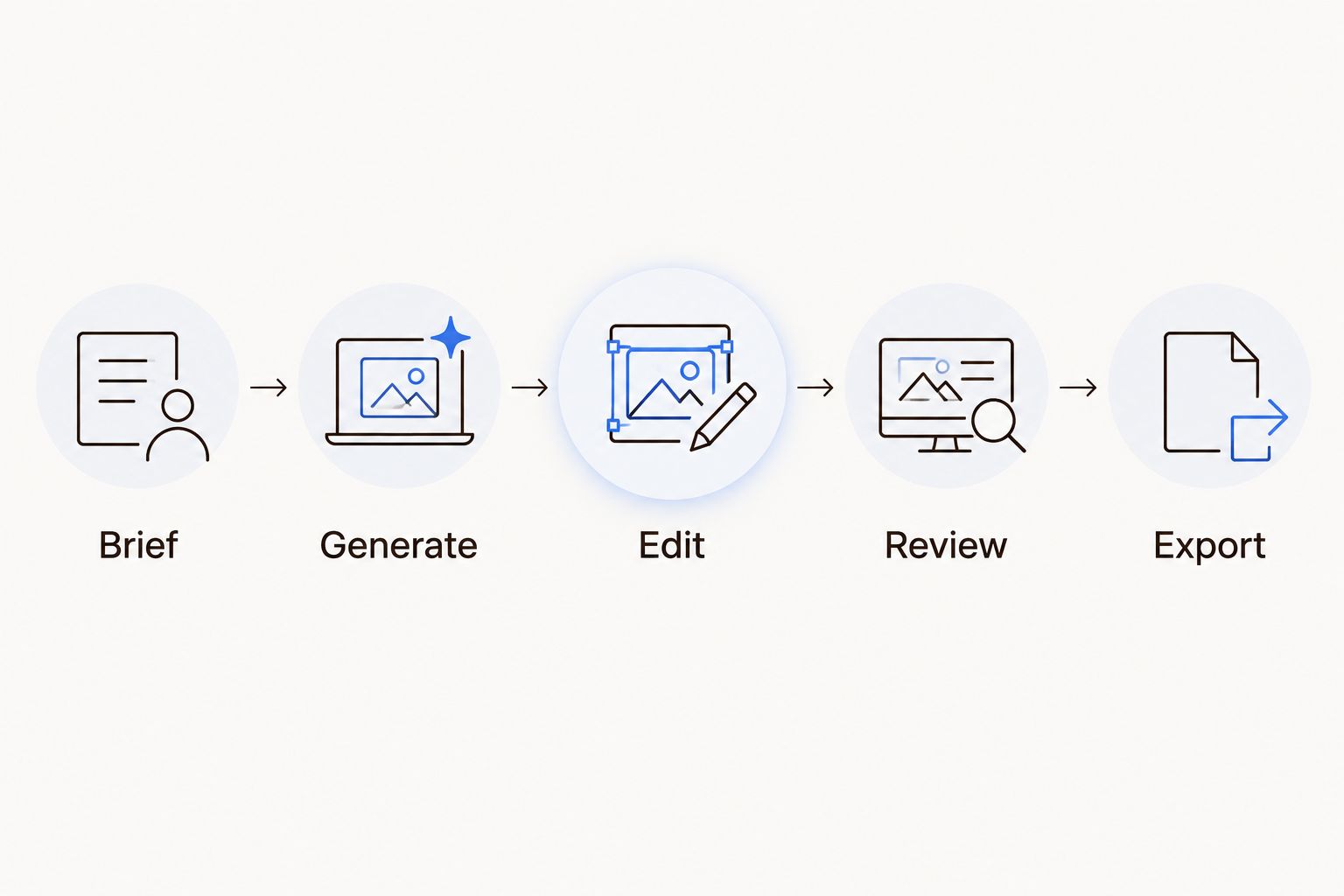
Count the deliverable after review and export, not when generation finishes.
Record 3 time categories separately: active editing, review, and delivery preparation. Keep unattended generation time separate from active labor; they describe different constraints.
Use the same labor valuation method throughout your comparison. Do not value one workflow's editing time and quietly treat another workflow's revision work as free.
Also record rejection reasons in plain language. Product distortion, unreadable text, incorrect claims, awkward movement, and missing source assets suggest different corrective actions; a single failure total hides those differences.
Test whether edits survive the workflow
A generated ad becomes more useful when you can change the parts a client actually comments on. Test ordinary revisions: replace a product image, shorten a scene, correct a headline, change an end card, and adjust audio placement.
Check which changes remain editable and which require a new generation. The distinction matters because a small correction should not be confused with a completely new creative attempt.
The controls to examine include:
Timeline control: Can you change scene order, timing, and the relationship between visual and audio elements?
Layer control: Can you change text and image elements independently rather than replacing a flattened composition?
Assistant control: Can you request a specific change, inspect the result, and make a manual correction?
Revision continuity: Can you preserve approved elements while changing the rejected part?
A template is not automatically restrictive, and a generated scene is not automatically editable. The relevant question is whether the required correction fits the controls; the guide to AI video templates you can actually edit addresses that distinction.
Is regeneration cheaper than editing?
Regeneration wins only when its recorded total cost is lower and the replacement passes the same checklist. Editing wins when it preserves acceptable work while correcting the specific defect.
Do not decide from the generation charge alone. Include the time spent checking whether the replacement introduced a new problem.
Why cost per usable export varies
These production factors change what enters the calculation. Record them alongside your 2026 results rather than treating every ad as equivalent.
Reference readiness: Missing or unsuitable product references create preparation work before generation can begin.
Generation acceptance: Rejected attempts add production cost without adding accepted exports.
Editing depth: Text changes, scene reconstruction, and audio corrections require different work.
Approval scope: Internal approval and client approval are different finish lines; choose one and apply it consistently.
Deliverable requirements: Additional formats and message variants need their own checks when the brief requires them.
Workflow reuse: A reusable process still needs product-specific inputs and review; separate initial setup from repeat production.
Keep setup cost visible instead of deleting it. You can report initial setup separately from repeat-batch work, but both belong in the decision when you are choosing a production process.
Match the test to your monthly creative workload
A tool comparison should reflect the work you need to deliver, not just an isolated impressive clip. Planning around monthly ad creative volume requires distinguishing genuinely different concepts from format versions and revision files.
Build your test batch from those deliverable types. If your agency mainly adapts approved concepts for clients, test revision handling; if your store needs new product demonstrations, test reference accuracy and scene creation.
For your 2026 production plan, separate initial concepts, accepted variants, and delivery formats in the log. This prevents a workflow that creates many near-identical files from appearing more productive than one that completes the actual brief.
Do not use cost per usable export as a substitute for advertising performance. Production acceptance tells you whether an ad is ready to run; it does not establish whether that ad will generate sales.
Where Planegraph fits in the comparison
Planegraph is best for ad teams that need generation, editable video and image output, and reusable workflows in one workspace. Its video timeline and layered image canvas give you controls to assess beyond the initial generated asset.
The platform's AI assistants make requested changes, while manual controls support final adjustments. Prism adds planning, checking, and retries; include the work produced by those steps in your evaluation rather than assuming an autonomous attempt is an approved deliverable.
Planegraph's ad-making workflow also includes a library of thousands of Meta ads that AI can remix around a product, using models such as Nano Banana. Built-in avatars, pose guides, and reference content provide additional inputs for the creative process.
The advantage is a connected production path. The limitation is equally important: access to generation, references, and editing does not establish a measured cost advantage or guarantee product accuracy, approved claims, or client acceptance.
When evaluating Planegraph as an AI video ad generator, apply exactly the same brief and acceptance rules used elsewhere. Documented capabilities belong in the feature comparison; only your recorded production results belong in the cost calculation.
Review the exported file, not just the editor
Perform 2 delivery reviews: inspect the approved composition in the editor, then inspect the exported file independently. Confirm that the exported version contains the intended text, scene order, audio, and framing.
Tie the final file to its approval record. A timeline can look correct while the delivered version comes from an earlier revision, so the file itself must be the object that passes.
For a repeatable 2026 comparison, preserve these records:
The brief and source assets used.
The generation and editing history.
The rejection reasons and final approval.
The delivered filename and accepted-export count.
The cost allocation and labor method.
A lower total is meaningful only when the acceptance standard stays fixed. Relaxing product accuracy or removing client review creates a different test, not a more efficient workflow.
FAQ
What's the fairest way to compare an AI video ad generator?
Compare total attributable production cost divided by accepted exports, using the same brief and approval checklist. Include failed attempts, editing, review, and delivery preparation.
Does a downloaded video count as a usable export?
A downloaded video counts only after it passes the agreed creative and delivery requirements. Successful generation and successful delivery are separate checkpoints.
Should I include my editing time in the calculation?
Include active editing time when comparing the total cost of finished ads. Apply the same labor valuation method to every workflow so manual corrections are not hidden.
Is a template-based ad maker better than a generation-first tool?
Neither workflow wins without matching your brief and revision needs. Template-led work suits repeatable structures, while generation-first work fits teams that already have an editing process; test the required changes in each.
How do I compare tools when they use different credit systems?
Convert the tool usage assigned to your batch into attributable cost rather than comparing credit counts directly. Add labor and other production costs before dividing by accepted exports.
Does cost per usable export tell me which ad will perform best?
Cost per usable export measures production efficiency, not advertising performance. Keep campaign outcomes separate from the checklist used to approve production deliverables.
One last thing
Keep rejected files in your evaluation log. A failure with a clear reason tells you whether to improve the source material, change the prompt, use an editing control, or reject the workflow for that task.
The strongest comparison explains why work failed—not just how many files passed. That explanation gives your next production batch a concrete starting point.