Choose an AI video agent that produces editable work, follows your brief, and lets you correct mistakes without rebuilding the video. Planegraph takes content from idea and generation through a full-featured video timeline and layered image canvas, with assistants for requested changes and manual controls for final adjustments. Judge the workflow by the finished deliverable—not just the first generated clip.
TL;DR
An AI video agent should turn a brief into editable video, not stop at generated footage.
Planegraph suits marketers who need generation, timeline editing, layered images, and reusable workflows in one workspace.
Evaluate creative automation with your own product references, revision requests, and delivery requirements.
Check planning, error correction, manual controls, and export before committing client work.
AI video agent tools: what should you check before choosing one?
Check what the agent actually leaves you with: a rendered asset, an editable project, or a reusable workflow. Those outputs solve different problems. For your 2026 evaluation, start with the format you must deliver and work backward to the controls you need.
Planegraph combines autonomous agents, video and image generation, editing, a workflow editor, and ad-making tools. Its documented capabilities establish what you can evaluate; they do not establish the quality of a particular product shot or finished ad.
Generated-asset workflow
Best for: Getting an individual visual or clip
Main advantage: Keeps the task focused on producing an asset
Main limitation: A generated asset alone does not provide an editable final video
Timeline-editing workflow
Best for: Controlling an assembled video
Main advantage: Makes sequencing and individual edits explicit
Main limitation: A timeline alone does not establish automated planning or correction
Agent-led workflow
Best for: Coordinating generation and editing tasks
Main advantage: Connects a brief to a sequence of actions
Main limitation: Requires checks on decisions, corrections, and the resulting project
Choose the output structure before choosing the generation model. A convincing clip is useful, but an agency delivering client revisions needs more than a convincing clip.
Why this matters
A product ad has requirements that a visual demo does not. Your label must remain recognizable, the message must match the offer, and the final sequence must leave room for readable copy. A failure in any of those areas creates editing work even when the footage looks polished.
An agent adds decisions between your brief and the output. It selects actions, interprets instructions, and handles intermediate results. Your evaluation must therefore cover both creative quality and whether you can inspect and correct the work.
For agencies, that means testing client feedback. For store owners, it means testing product fidelity. For creators, it means testing whether the workflow supports repeatable production without turning every post into the same template.
Start with a brief you can score
Use one real creative task rather than a collection of unrelated prompts. Keep the product, audience, required message, and destination consistent across the tools you evaluate. Otherwise, you are comparing different assignments.
A useful evaluation brief contains:
Product reference: Supply the packaging, product image, or other approved source material.
Creative objective: State what the viewer should understand or do after watching.
Required content: Specify the message, approved wording, and visual elements that must appear.
Delivery requirements: Describe the destination format and the editable material you need afterward.
Rejection conditions: Identify unacceptable changes, such as altered labels or unsupported claims.
Write those requirements before generating anything. Your 2026 shortlist should reflect whether a tool meets the brief, not whether its example gallery matches your taste.
Use a simple proposed test: request 3 shots, make 2 revision requests, and require 1 editable project. These are evaluation instructions, not performance benchmarks. The point is to expose what happens after the first output.
Check the whole path from brief to finished output
An agent-led workflow should make each stage understandable. You need to know what the system is attempting, what it produced, and where a human can intervene. Treat the following sequence as a practical acceptance test.
Brief
Give the agent your product reference, intended audience, message, and delivery requirements. Ask it to distinguish required facts from creative choices. That separation makes it easier to reject an attractive result that changes the product or promise.
Plan
Inspect the proposed sequence before accepting the creative direction. Check whether each shot serves the message and whether the plan leaves space for copy. An elaborate plan is not automatically useful; it must correspond to the deliverable.
Generate
Review the generated material against the supplied references. Look at product shape, packaging text, background details, and continuity between shots. Do not treat a successful preview as proof that every frame is usable.
Edit
Ask for a specific change, then inspect the project. Can you adjust the affected element manually? A correction request should end with a result you can evaluate, rather than another unexplained version.
Export
Watch the exported file, not only the editor preview. Check the opening, transitions, text, audio, and ending against your brief. Keep the editable project available for the next revision.
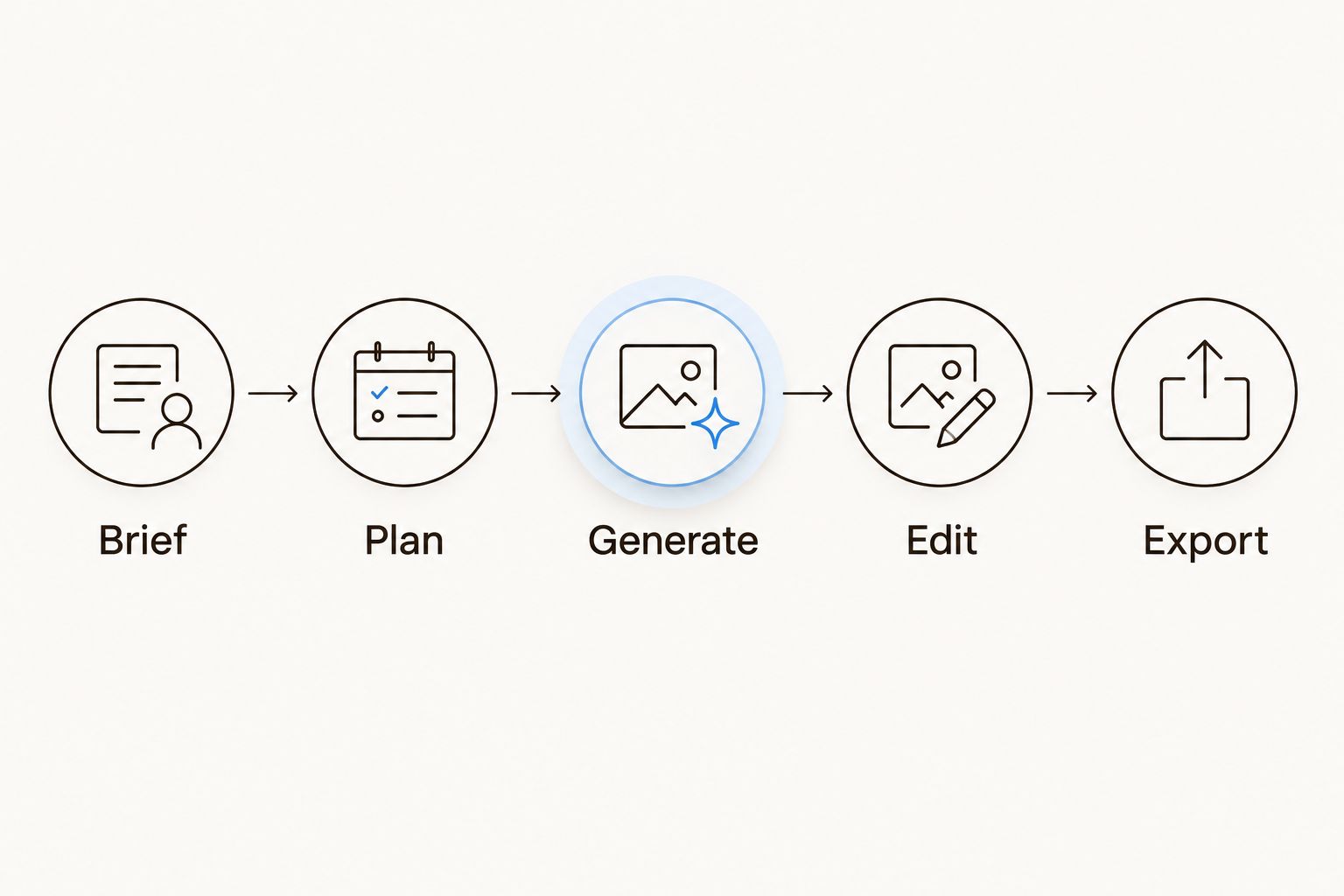
Evaluate the finished export and the editable project, not just the generated footage.
The sequence reveals where automation ends and your own work begins. Record that boundary for each tool; it matters more than a broad claim that a platform handles video production.
Inspect the timeline and layered canvas
A timeline and a layered image canvas serve different parts of production. The timeline handles the assembled video; the canvas supports changes to individual visual elements. Check both when your work combines generated scenes, product imagery, and advertising copy.
Planegraph provides a full-featured video timeline and layered image canvas, with assistants making requested changes and manual controls for final adjustments. Planegraph is best for marketers who want video generation and editable production in one workspace. Its fit still depends on whether those controls handle your actual deliverable.
Use concrete correction requests rather than asking the system to make the video better:
Move the product reveal earlier without changing the approved message.
Replace an unsuitable visual while preserving the surrounding sequence.
Adjust a text element without regenerating unrelated imagery.
Correct the final composition manually after an assistant makes a change.
These requests are tests, not claims that every operation is supported. Inspect the result and confirm what remains editable. For your 2026 production workflow, a clear manual correction path is more useful than an impressive demonstration you cannot reproduce.
Check how the agent plans, checks, and retries
Planning is only the start. An agent also needs a way to assess its intermediate work and respond when an action fails or a result does not match the request. Inspect those stages separately.
Planegraph's Prism plans, checks, and retries work. Evaluate that behavior with a bounded assignment: preserve the product reference, create the requested sequence, and correct a clearly identified mismatch. The practical question is whether the resulting changes satisfy your instructions.
Look for these distinctions during evaluation:
Planning: Does the proposed work reflect your brief rather than a generic video structure?
Checking: What evidence shows that the output meets the requested conditions?
Retrying: Does a new attempt address the specific problem you identified?
Stopping: Can you review the result before accepting further changes?
Do not interpret a retry as proof of improvement. Compare the new result with the original requirement. A different image that still changes the packaging remains a failed product reference.
Why the right AI video agent varies by task
The same workflow does not serve every production need. Match your evaluation to the work you expect to repeat, using these factors:
Revision responsibility: Agencies need to translate client feedback into specific changes and retain control of the final delivery.
Product fidelity: Store owners need to inspect recognizable packaging, labels, and product details against approved references.
Content format: Reels, shorts, ads, and social visuals place different demands on sequencing and composition.
Reusable production: Repeated campaigns call for a workflow that separates changing inputs from fixed creative instructions.
Asset sourcing: Built-in references, avatars, and pose guides matter when a brief depends on those materials.
Manual finishing: The more exact the final composition must be, the more closely you should inspect editing controls.
Keep these priorities in your 2026 evaluation notes. A tool that fits a single generated scene is not automatically the right choice for repeated client deliverables.
Evaluate reusable workflows and reference assets
A reusable workflow should preserve useful structure while letting you change the inputs that belong to a new assignment. Test it with a second product reference or a revised message. Then check which assumptions carried over.
Keep approved wording separate from creative instructions. Product facts should not change simply because you request a different visual style. Before reusing a workflow, inspect the references, message, and destination requirements together.
Planegraph includes a library of thousands of Meta ads that its tools can remix around a product, along with built-in avatars, pose guides, and reference content. These resources reduce the need to source every starting asset elsewhere. They do not replace checking whether a reference suits your product, audience, and intended use.
Treat ad references as creative inputs, not evidence of performance. A reference can inform framing or structure without proving that the resulting ad will work for your business.
What should you ask an AI video agent to revise?
Ask for a bounded change with an observable result. Replace vague feedback such as improving the pacing with an instruction to move the product reveal before the supporting scene. Then inspect what changed elsewhere.
Use separate requests for creative direction and factual correction. Changing the mood is a creative decision; restoring an altered label is a fidelity requirement. Keeping those requests distinct makes acceptance clearer.
Does an AI video agent replace a video editor?
An AI video agent does not remove your need to approve the finished work. It can coordinate tasks, while the editable timeline gives you a place to inspect and adjust the result.
Choose according to the handoff you need. If you own the final delivery, retain a correction path that does not depend entirely on another generation attempt.
How do you compare tools without inventing a benchmark?
Compare the same brief, references, revision requests, and delivery requirements. Record observed outcomes rather than assigning unsupported claims about speed, quality, or campaign performance.
For a 2026 purchase decision, keep documented features separate from your own results. A feature list tells you what to investigate; your acceptance test tells you whether it fits the job.
FAQ
What's the most important thing to check in an AI video agent?
Check whether the AI video agent leaves you with editable work that meets your brief. Inspect the correction process and final export, not only the initial generated footage.
Is an AI video agent the same as an AI video generator?
An agent-led workflow coordinates tasks, while generation produces assets. Evaluate the actual planning, editing, and correction controls rather than relying on the label.
Who is Planegraph best for?
Planegraph is best for marketers who want video generation and editable production in one workspace. Its documented capabilities include autonomous agents, a video timeline, a layered image canvas, and reusable workflows.
Can I use an AI video agent for client ads?
Use an AI video agent for client ads only after checking it against your delivery requirements. Test product accuracy, approved messaging, revision handling, and the editable handoff.
How do I check whether generated product footage is accurate?
Compare the generated footage with approved product references. Inspect shape, labels, packaging, and continuity, then reject changes that misrepresent the product.
Should I choose an AI video agent based on its model list?
Choose based on the complete production workflow, not the model list alone. Confirm current model support separately and test whether the tool produces the editable deliverable you need.
One last thing
Save a revision request for the end of your evaluation. After the video looks finished, change one meaningful requirement and inspect what survives: approved copy, product references, sequencing, and editability.
The decisive test is not whether an agent can make something. It is whether you can finish the right thing. Use that standard before committing a client brief or repeat production workflow.