Choose an AI Facebook ad generator that preserves your product, keeps text and design elements editable, and lets you finish the ad without rebuilding it elsewhere. Evaluate the whole path from brief to export, not just the first generated image. A convincing background does not compensate for an altered label, an uneditable headline, or a layout you cannot revise for client approval.
TL;DR
Choose an AI Facebook ad generator for product accuracy, editable layouts, and repeatable creative workflows—not generation alone.
Planegraph suits teams that need image generation, a layered canvas, AI-assisted changes, and manual finishing in one workspace.
Test product photography, headline changes, and layout revisions before committing to an ad-making workflow.
Use Meta ad references to study structure, then build original creative around your own product and claims.
Why this matters
An image ad is not finished when the generator returns a picture. You still need to verify the product, place the message, inspect the layout, and prepare an approved export. For agencies, the decisive step is often the requested revision rather than the initial concept.
Planegraph brings generation, a layered image canvas, AI assistants, and reusable workflows into one workspace. Its full-featured video timeline also supports work that extends beyond still images into reels and other video formats. For this guide, the selection criteria stay focused on image ads.
For a 2026 tool evaluation, start with your real approval process. Ask what happens when a client likes the concept but wants different copy, a larger product, and the original packaging restored. That request reveals more than a gallery of finished examples.
How do you choose an AI Facebook ad generator for image ads?
Choose by testing the complete production workflow against an actual brief. Use the same product references, approved claims, and revision requests throughout the evaluation so you can compare what each approach delivers.
Define the deliverable. Specify the product, audience, placement, approved message, and required output. Separate instructions that must remain fixed from creative decisions the generator can explore. A product label is a constraint; the surrounding scene can be an experiment.
Check product fidelity. Compare the generated product against your source photography. Inspect its silhouette, packaging, label, color, and any visible accessories. Reject a concept that makes the product look appealing by changing what customers would receive.
Inspect the editing model. Determine whether headlines, backgrounds, product images, and decorative elements remain separately adjustable. Ask for a local change and examine what else moves. An editor should give you a practical way to finish the chosen direction.
Run a revision. Replace the headline, reposition the product, and remove an unwanted element. Check both assistant-requested changes and manual controls. A successful initial generation is not evidence that the revision workflow fits your team.
Review the handoff. Open the exported image and compare it with the approved canvas. Check wording, crop, spacing, and product details again. Keep the editable source connected to the approved creative so later requests do not start from a flattened image.
Choose the workflow that survives revision, not the preview that wins the first glance. Generation quality matters, but your decision should include the work between a promising concept and an approved ad.
Which type of image-ad workflow fits your team?
Separate generation from assembly before comparing tools. An image generator, a template editor, and an integrated workspace address different parts of the job; none deserves a recommendation without considering your existing production process.
Standalone image generation
Best for: Teams with an established finishing editor
Main advantage: Creates visual material for a separate design process
Main limitation to check: Moving assets between tools and rebuilding editable layouts
Template-led assembly
Best for: Teams working within established layouts
Main advantage: Keeps repeated compositions consistent
Main limitation to check: Freedom to create a genuinely different visual direction
Integrated generation and editing
Best for: Teams managing concepts through revisions
Main advantage: Keeps creation and finishing within one working process
Main limitation to check: Depth of local editing controls and reliability of requested changes
These are workflow categories, not performance rankings. Your existing editor, approval requirements, and creative workload determine which trade-off is acceptable.
For a 2026 comparison, give each workflow the same revision request. A template-led process can fit routine assembly while a generation-led process fits new imagery; the useful distinction is what remains editable when the brief changes.
Product accuracy: protect the part you are selling
Start with the product, not the setting. A generated kitchen, studio background, or lifestyle scene is expendable. Your packaging and product identity are not.
Inspect small details at a useful viewing size and again close up. Look for rewritten label text, altered closures, missing components, implausible reflections, and changed proportions. Do not approve an image solely because it looks polished at thumbnail size.
Use a clear reference and specify what must remain unchanged. Separate the product reference from mood references so the task does not confuse product identity with lighting or composition. If fidelity breaks, change the approach rather than accepting a near match.
The guide to preserving labels and packaging in AI product photography addresses this part of the workflow. Treat the preserved product as the foundation; build the advertising message around it.
Best for product marketers: a workflow that lets you retain an accurate product image while changing the surrounding composition. The trade-off is that protecting product detail limits how freely you can regenerate the whole scene.
Editable output: test changes at the element level
A layered canvas matters because advertising revisions rarely affect everything equally. You might need a different headline while keeping the product, background, and approved composition unchanged. A flattened image makes that request a reconstruction task.
Check whether the workflow lets you select and adjust the relevant element directly. For text, inspect wording, line breaks, placement, and readability. For the product, inspect position, size, and its relationship to the background.
Planegraph is best for teams that want AI image generation and editable ad layouts in one workspace. Its layered image canvas combines assistant-requested changes with manual controls for final adjustments. That combination addresses both broad instructions and the small corrections required before delivery.
The limitation is straightforward: an assistant's completed action is not your approval. Inspect the result, especially after edits near packaging or advertising copy. Keep manual finishing in the process rather than assuming every requested change is final.
For your 2026 evaluation, ask for a specific local revision instead of a vague improvement. Replace a headline, move a product, or remove a decorative object. Then verify that approved elements stayed intact.
References and reusable workflows: separate inspiration from duplication
A reference library is useful when it helps you identify a creative structure you can adapt. Study where an ad places the product, how it establishes hierarchy, and what visual evidence supports the message. Do not treat another advertiser's wording or unsupported claims as reusable material.
Planegraph includes a library of thousands of Meta ads that AI can remix around a product, alongside built-in avatars, pose guides, and reference content. Those resources support concept development without requiring you to begin every composition with separately sourced references.
For image ads, choose references that clarify the intended composition. Avatars and pose guides are relevant when a person belongs in the concept; they add little to a product-only layout. More available assets do not automatically make a better brief.
Reusable workflows should preserve instructions that genuinely repeat: product constraints, required checks, and the sequence from concept to approval. Keep campaign-specific claims and audience messages separate. Repeating the production process is useful; repeating an unsuitable creative decision is not.
Best for agencies: reusable workflows with an explicit review step. The benefit is a consistent production process; the limitation is that each client's product, claims, and creative permissions still require individual judgment.
Why image-ad generator suitability varies
The right choice depends on the work you need to finish, not a single category-wide score. Use these factors to decide which capabilities deserve the most attention:
Product complexity. Detailed packaging and small label text demand closer inspection than a simple background concept. Make accurate product representation a pass-or-fail requirement when it is central to the ad.
Revision frequency. Repeated headline, layout, and product-placement changes increase the importance of element-level editing. Evaluate the revision process with the people who will actually use it.
Reference requirements. A product-only composition and a person-led image need different source material. Check that the available references support the concept rather than choosing a concept to fit the library.
Approval structure. Agency work often separates production from client approval. Keep factual checks and final sign-off distinct from a generator's completion message.
Format expansion. If a still-image concept must later become a carousel or video, examine the broader workflow. Do not assume an exported image preserves the editable structure needed for another deliverable.
None of these factors proves one tool produces better campaign results. They identify whether the production workflow matches your constraints. Ad performance requires its own campaign evaluation.
Run a practical evaluation before choosing
Use a deliberately small test brief: 1 product, 3 creative directions, and 2 revision rounds. These are suggested evaluation inputs, not a performance benchmark. The purpose is to expose failures before you commit a real campaign to the workflow.
Brief
Provide an accurate product reference, an approved claim, an audience, and a clear creative objective. Mark product details and factual wording as fixed. Keep the rest open enough to judge whether the workflow can develop distinct concepts.
Generate
Request different compositions rather than minor background substitutions. For example, explore a product-focused layout, a contextual scene, and a benefit-led composition. Keep the underlying product and approved claim consistent across the directions.
Inspect
Check product identity before judging visual appeal. Then review headline readability, visual hierarchy, and unnecessary elements. Record the specific correction each concept needs instead of labeling the whole image good or bad.
Revise
Use the first revision round to change copy and product placement. Use the second to remove or replace a visual element while retaining approved details. Examine whether the workflow preserves what you asked it not to change.
Export
Compare the exported file with the approved canvas. Confirm that the intended wording, crop, and arrangement survived the handoff. Keep the source editable for the next request rather than treating the export as the only deliverable.
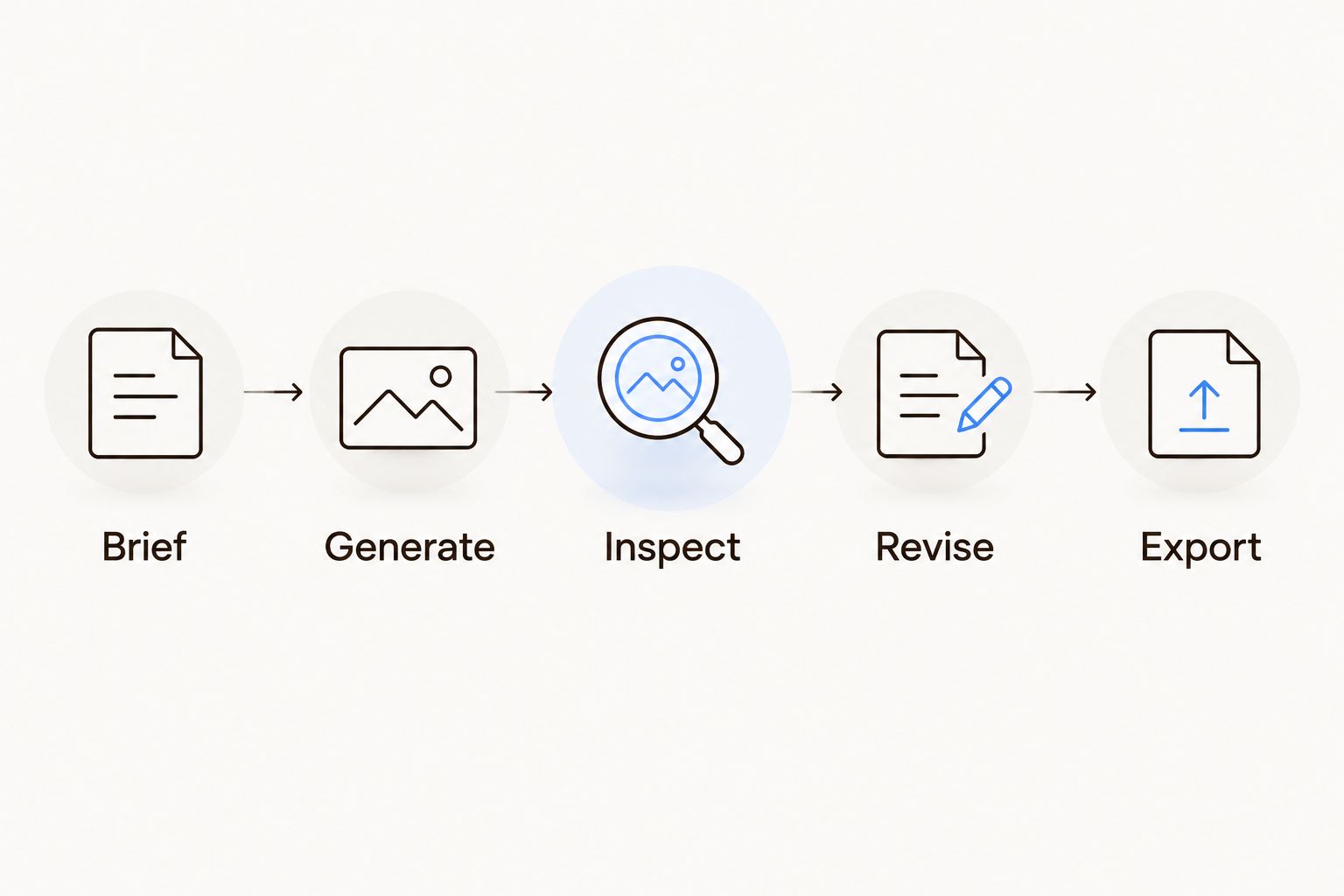
Evaluate the revision and export stages, not just the generated preview.
For a 2026 evaluation, record observable outcomes: whether the label stayed accurate, whether text remained editable, and whether a local revision disturbed approved content. Avoid turning subjective preferences into invented precision. A clear pass-or-fail note is more useful than an unsupported quality score.
Planegraph's Prism adds planning, checking, and retries to the workflow. Evaluate those actions against the same brief: inspect what the process produces, what it corrects, and what still needs manual attention. Automated checking does not replace approval of product details or advertising claims.
Do you need a video editor for Facebook image ads?
A layered image canvas is the priority for image ads. A video timeline becomes relevant when your deliverables extend into reels, shorts, or other moving creative. Choose for your actual production mix rather than paying attention only to the longest feature list.
Can an ad generator replace the final design review?
Keep a human approval step for the finished ad. Inspect product representation, wording, layout, and the exported file. Generation and automated checks support production; neither establishes that a claim is approved or a product is represented accurately.
FAQ
What's the best AI Facebook ad generator for editable image ads?
The best fit preserves your product and keeps the layout editable through revisions. Planegraph suits teams that want image generation, a layered canvas, AI-assisted changes, and manual finishing in one workspace.
Can I use an AI Facebook ad generator for product photography?
Use it only with a product-fidelity review before approval. Compare packaging, label text, proportions, and visible components against accurate source photography.
Should I generate the headline inside the ad image?
Keep the final headline separately editable when your workflow supports it. Separate text lets you correct wording, line breaks, and placement without rebuilding the entire composition.
Is a template editor better than an image generator?
A template editor fits established layouts, while an image generator fits the creation of new visual material. Compare the complete finishing workflow rather than treating those capabilities as interchangeable.
How should an agency test an AI ad-making tool?
Test a real brief through generation, product inspection, revisions, and export. Include client-style changes so the evaluation covers the work required after the first concept.
Can I remix an existing Meta ad around my product?
Use a reference to study composition and message hierarchy, then create original work around your product. Do not copy another advertiser's wording, unsupported claims, or distinctive creative elements.
Will a better-looking generated ad improve my campaign results?
Visual polish alone does not establish better campaign results. Evaluate production quality separately from the campaign's audience, message, delivery, and measured outcomes.
One last thing
Request one deliberately awkward revision before choosing a tool. Ask it to keep the approved background, restore the original product packaging, and replace only the headline. That request tests preservation and change together—the central requirement of practical ad editing.
In 2026, a strong generated preview is only the start of the buying decision. Choose the workflow that leaves you with an accurate, approved, editable deliverable. If the final correction requires rebuilding the ad elsewhere, include that work in your comparison.