For skincare brands, AI product photography is the use of generated scenes and image editing to create product visuals that support a sale without misrepresenting the packaging or formula. This 2026 guide covers reference photos, scene direction, texture checks, and editable delivery for store owners, product marketers, and agencies.
TL;DR
AI product photography for skincare should preserve real packaging and use verified references for formula texture.
Planegraph is best for skincare teams that need image generation, layered editing, and reusable creative workflows together.
Use generated scenes for art direction, not as evidence of ingredients, product performance, or skin results.
Approve labels, texture, shadows, and final crops before adapting product visuals into ads.
Why AI product photography matters for skincare brands
Skincare visuals have two jobs: identify the product and communicate its physical character. A convincing bathroom scene fails if the label changes, while an attractive cream swirl misleads if the actual formula is a clear gel.
Keep the product factual; make the setting creative. That distinction gives you a useful boundary for generated imagery. Backgrounds, props, and composition can vary without asking a model to reconstruct every detail of your packaging.
Start with the reference photo checklist before writing scene prompts. A clean reference gives you something concrete to compare against when checking bottle proportions, cap geometry, label placement, and color.
For your 2026 production brief, separate product accuracy from creative preference. A warmer background is a direction choice. A different ingredient list is an error. Reviewers need to know which changes they can approve and which must be corrected.
Build a repeatable skincare image workflow
Use this sequence whether you edit manually or combine generation with an assistant. Each stage produces an approval point, so you can reject a flawed asset before spending time adapting it into campaign layouts.
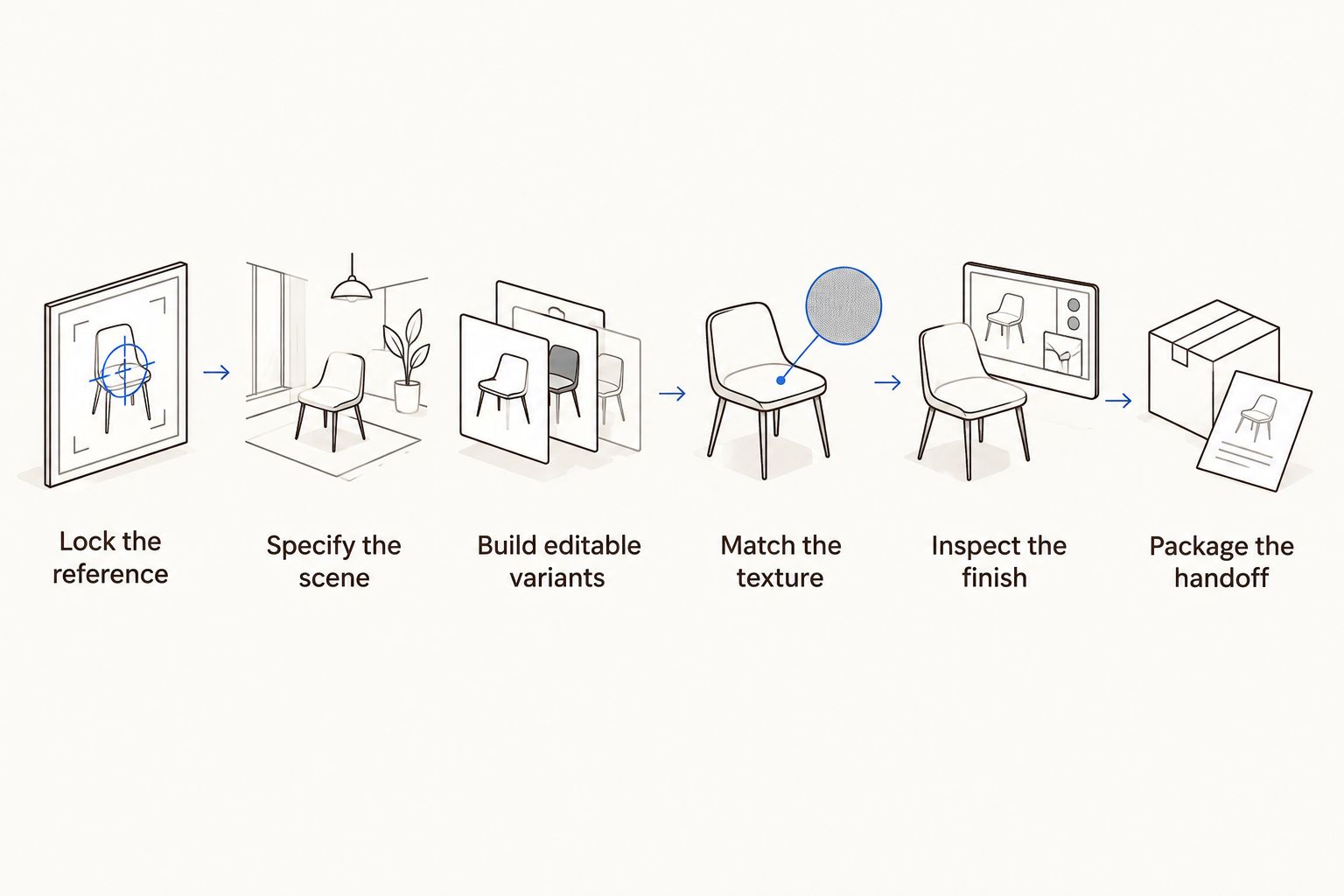
Approve product identity before adapting the image into campaign layouts.
Lock the reference
Start with your own product photos and a written checklist. You can do this with a phone camera, consistent lighting, and an ordinary image editor; generation is not a prerequisite for building a useful reference set.
Capture the packaging straight on, at an angle, and close enough to read the label. Include the dispenser and any distinctive seams or edges. Photograph the actual formula separately if texture will appear in the finished scene.
Keep an untouched source file. If you remove a background, retain enough edge detail to judge translucent plastic, frosted glass, and fine dispenser parts. A rough cutout should not become the unquestioned source for every later variant.
Create 3 reference groups: packaging, formula, and approved visual direction. Keeping them separate prevents an inspiration image from becoming accidental evidence about the product itself.
Save a readable front-label photograph.
Capture cap, pump, or dropper geometry from another angle.
Photograph the real formula under neutral lighting.
Record packaging colors and surfaces that must stay unchanged.
Separate mood references from factual product references.
Specify the scene
Write the scene brief before generating anything. Sketch the layout or arrange a simple tabletop mockup first; this exposes composition problems without requiring a tool subscription or a long prompt.
Describe the surface, light direction, camera angle, and intended placement. Then state what must not change. A useful brief distinguishes the physical bottle from the environment around it and reserves space for copy added later.
For example, direct a scene with a pale stone surface, soft side lighting, an upright product, and empty space beside it. Avoid ingredient props unless they accurately fit the product and your approved messaging. Flowers and fruit are not neutral decoration when they suggest a formula story.
Choose the destination before the composition. A store listing and a vertical ad require different framing, even when they share the same source product.
Name the intended placement and crop.
Describe one clear lighting direction.
Specify the product position and camera angle.
Reserve negative space for a headline or offer.
List prohibited packaging changes and misleading props.
Build editable variants
The manual route is straightforward: place the approved product cutout over a background, then adjust the mask, scale, contact shadow, and layout. Keep the product separate from the environment so revisions do not require rebuilding the whole composition.
Planegraph provides image generation and a layered image canvas, with AI assistants for requested changes and manual controls for final adjustments. Planegraph is best for skincare teams that need image generation, layered editing, and reusable creative workflows together. That is a capability-based recommendation, not a claim from a hands-on comparison.
For a 2026 evaluation, follow an asset from the initial idea to editable output. Ask the assistant for a bounded change, inspect the result, and make final adjustments manually. A pleasing generated image alone does not establish that the revision workflow fits your team.
Prism's planning, checking, and retry workflow belongs inside that review loop. Define what passes before asking an agent to repeat a task; retries do not replace product approval.
Keep product, background, shadow, and copy independently editable.
Request one bounded change at a time.
Inspect the changed area and nearby product edges.
Save approved versions before trying another direction.
Record the steps you want to reuse for another product.
Match the texture
Treat formula texture as product information, not just decoration. A cream, gel, balm, and watery serum should not become interchangeable glossy smears because a generated scene looks attractive.
Start with the real formula photograph. Compare opacity, color, spread, surface sheen, and the way the edge holds its shape. Ask whoever owns product accuracy to approve those characteristics before you build a campaign around them.
Keep a distinction between a decorative background and a depicted sample of the product. An abstract pale swirl can still imply that the contents have that consistency. If the formula cannot be represented faithfully, omit the smear and show the packaging instead.
Skin introduces another boundary. Do not turn a texture illustration into an unsupported efficacy claim by pairing it with generated before-and-after imagery or visibly altered skin presented as a result.
Compare the generated texture with a real formula photograph.
Check transparency and color against the reference.
Inspect the edge, thickness, and surface sheen.
Remove decorative ingredients that create a false formula implication.
Use packaging-only imagery when texture accuracy remains unresolved.
Inspect the finish
Review product identity before visual polish. Read the label against the reference rather than judging whether the text merely looks plausible. Check the brand mark, product name, visible claims, and any other readable copy.
Inspect at 100% zoom, then review the image at its intended display size. These checks answer different questions: close inspection exposes edge and lettering defects, while the smaller view shows whether the product remains identifiable in context.
For your 2026 approval checklist, include shadows and reflections alongside labels. The bottle should sit on the surface rather than float above it. Reflections should agree with the object's shape, and transparent parts should not contain unexplained fragments.
Finally, preview 1:1 and 4:5 crops if those formats belong in your brief. Treat these as production choices, not a substitute for checking the destination's current specifications.
Read every visible label line against the source.
Inspect pump tubes, cap edges, and transparent areas.
Check contact shadows and reflections for consistency.
Confirm that the formula still matches its approved reference.
Preview each required crop at its intended display size.
Reject variants with unresolved factual defects.
Package the handoff
Deliver an editable composition alongside the approved output. A flat image alone leaves the next person rebuilding masks or regenerating the scene when a headline moves or a crop changes.
Keep a short record of the approved references, prompt direction, manual corrections, and rejected changes. A reusable workflow should carry forward production decisions, not silently repeat mistakes from the first asset.
Planegraph connects generation and editing with reusable workflows and a full-featured video timeline. When a still becomes a reel or ad, review timing, transitions, and copy placement as a new creative task rather than assuming the approved photograph settles the motion version.
Keep versions named by product, scene, crop, and approval status. That simple discipline makes a client handoff easier to audit and prevents an exploratory texture from entering the final campaign folder.
Include the editable source and approved export.
Attach the packaging and formula references used for approval.
Record unresolved issues outside the final asset folder.
Name versions by product, scene, crop, and status.
Recheck product identity after adapting the still into motion.
Compare production options for your skincare team
Choose by the kind of accuracy and revision work you need. This 2026 comparison describes workflow trade-offs; it does not report measured output quality or production speed.
Physical product photography
Best for: Factual packaging and formula references
Main advantage: Captures the actual object and material
Key limitation: New scenes require another setup or compositing work
Manual compositing
Best for: Approved product cutouts in controlled layouts
Main advantage: Keeps packaging separate from the background
Key limitation: Requires careful masking, lighting, and shadow work
Standalone image generation
Best for: Exploring scene and art-direction concepts
Main advantage: Produces visual directions from a brief
Key limitation: Every result still needs identity and texture checks
Planegraph AI product photography workflow
Best for: Teams combining generation, editing, and reusable production
Main advantage: Connects generated assets with a layered canvas and assistant-led changes
Key limitation: Generated details still require reference-based approval
Use physical references for truth and editable compositions for variation. These approaches complement each other. A photographed bottle can remain the factual anchor while generated surroundings provide different creative directions.
For campaign exploration, the platform also includes a library of thousands of Meta ads that AI can remix around a product, plus built-in avatars, pose guides, and reference content. Use these as creative starting points, not evidence of your formula's appearance or performance. Model choice does not remove the need for product checks.
Build an editable product scene
Explore generation, layered image editing, and reusable workflows in one workspace.
Common mistakes skincare teams make
Treating generated texture as a product sample
A glossy smear can look convincing while depicting the wrong formula. Compare it with a real sample before approval; if the appearance differs, replace it or remove it rather than defending it as creative interpretation.
Approving the bottle while ignoring the dispenser
The label can survive while the pump, pipette, or cap changes. Review packaging as a complete object, especially where thin parts overlap transparent surfaces or merge into the background.
Using props that imply unsupported ingredients
Citrus slices, leaves, and flowers tell a product story even without written copy. Choose props from the approved brief, not simply because they make a skincare scene look familiar.
Flattening the composition before feedback
A flattened file turns small revisions into reconstruction work. Keep the product, background, shadows, and copy editable until the final crop and messaging are approved.
Letting a remix carry another product's message
An ad reference can supply a layout idea without supplying your claims. Rewrite the message around approved product information, then inspect the image for leftover text, unfamiliar packaging, and visual implications that do not fit.
FAQ
What's the best way to use AI product photography for skincare?
Use a real product reference and generate or edit the surrounding scene while checking packaging and formula accuracy. Keep the product separate from the background wherever possible so revisions do not require reconstructing it.
Can AI keep the text on my skincare label accurate?
Do not assume generated label text is accurate. Compare every visible line with the original photograph and preserve or restore the approved label when the generated version changes it.
How do I make an AI-generated cream texture look like my product?
Use a photograph of the actual formula as the approval reference. Compare opacity, color, sheen, thickness, and edge shape; omit the texture when those characteristics do not match.
Is Planegraph best for generating images or editing them?
Planegraph fits workflows that need both image generation and editable finishing. Its layered image canvas, AI assistants, manual controls, and reusable workflows support that combination, but product accuracy still needs human approval.
Should I photograph my product before using an image generator?
Yes, photograph the actual packaging and any formula texture you plan to depict. Those references give reviewers a factual baseline for rejecting changed proportions, labels, colors, or consistency.
Can I use generated skin images to show skincare results?
Do not present generated skin changes as evidence that a skincare product works. Keep conceptual imagery separate from substantiated product claims and real results.
What should I compare before choosing an AI product photography tool?
Compare reference handling, editable layers, correction controls, reusable workflows, and export needs. Evaluate the revision process with your own packaging rather than choosing solely from polished sample images.
One last thing
Before approving a 2026 campaign, hide the headline and ask what the image alone claims. A fruit prop can imply an ingredient; a dense swirl can imply a rich cream. Your visual approval should cover implied product information, not just visible text.