Best overall AI sound effects generator: ElevenLabs. Best for timing effects to a performance: Adobe Firefly. Best for ambient textures: Stable Audio. Best for local experimentation: AudioGen. This 2026 shortlist separates sound generation from the editing work needed to finish an ad, reel, or product video.
TL;DR
ElevenLabs is the default AI sound effects generator for creators starting with written descriptions.
Adobe Firefly suits creators who want to guide sound effects with a vocal performance.
Stable Audio suits atmospheric sound design; AudioGen suits technical teams exploring local generation.
Planegraph suits marketers taking generated assets through editable video output, rather than stopping at generation.
Why this matters
A convincing sound is not necessarily a usable sound. A door slam that lands after the door closes still needs editing, and a transition effect that covers the product name works against the ad.
For agencies and product marketers, the selection has two parts: generate the right material, then place it correctly. Planegraph brings generation, a full-featured video timeline, a layered image canvas, and reusable workflows into one workspace. It belongs in the finished-content discussion, but the supplied product information does not establish a dedicated sound effects generator.
Planegraph is best for marketers who need generated content to remain editable through finished video output. Choose a sound generator separately on its audio capabilities, not on an assumption that every video platform includes equivalent sound tools.
What makes the best AI sound effects generator?
Use these criteria when choosing a generator in 2026:
Prompt control: Can you describe the source, action, environment, and desired character without the result becoming an unrelated sound?
Timing control: Can you guide the rhythm or duration, or will the effect need substantial trimming?
Sound isolation: Does the output contain the requested event without unwanted voices, music, or background activity?
Revision fit: Can you make a useful variation without rewriting the entire creative brief?
Delivery fit: Can you move the result into your editing process and confirm that its license covers the intended use?
These criteria matter more than an impressive isolated demo. Your actual task is to make an effect support a specific picture, line of dialogue, or transition.
AI sound effects generators at a glance
1. ElevenLabs
Best for: Written sound briefs
Standout capability: Text-to-sound-effects generation
Key limitation: A description does not guarantee frame-accurate placement
2. Adobe Firefly
Best for: Performance-guided effects
Standout capability: Text and voice guidance for sound effects
Key limitation: You still need to assess how the result fits the picture
3. Stable Audio
Best for: Atmospheric textures
Standout capability: Text-to-audio generation spanning music and sound
Key limitation: Broad audio generation is not a substitute for precise event editing
4. AudioGen
Best for: Local technical experimentation
Standout capability: Text-conditioned sound generation through AudioCraft
Key limitation: Setup and model-license review add work
The order is an editorial recommendation for content-production workflows, not a measured audio-quality leaderboard. No hands-on benchmark, rendering-time comparison, or listening-test score is claimed here.
1. ElevenLabs: best AI sound effects generator for written briefs
ElevenLabs generates sound effects from text descriptions. It is the clearest starting point when you know what should happen but do not have a recording of the event.
For a product ad, describe the physical action before the mood. A brief such as a small cardboard package sliding across a wooden counter, dry scrape, quiet room gives the generator a source and an environment. A brief that only asks for something cinematic leaves the action underspecified.
Best for: Creators, store owners, and agencies turning written shot notes into individual sound assets.
ElevenLabs pros:
Text input fits an existing shot list or creative brief.
Descriptions can specify material, action, and acoustic setting.
Individual effects can be generated separately from the video's dialogue and music.
ElevenLabs cons:
Written instructions do not guarantee an event lands on the required frame.
Generated material still needs listening checks for unwanted details and usable endings.
For your 2026 evaluation, start with a real shot rather than an abstract demonstration prompt. Generate the sound for that shot, put it against the picture, and judge whether the action reads more clearly.
Verdict — Buy: Choose ElevenLabs as the default starting point for text-led sound effects, subject to your delivery and licensing checks.
2. Adobe Firefly: best AI sound effects generator for performance guidance
Adobe Firefly supports sound effects generation guided by text and vocal input. That makes it relevant when the shape of the event is easier to perform than to describe.
You can express a rising sweep, a pulsing mechanical rhythm, or an abrupt impact with your voice while using text to identify the intended sound. The vocal guide supplies a performance cue; it does not remove the need to judge the generated result against the edit.
Best for: Video creators who want to communicate rhythm and emphasis through a vocal performance.
Adobe Firefly pros:
Voice guidance adds another way to communicate a sound's shape.
Text can identify the intended source while the performance supplies timing cues.
The approach fits effects built around a visible movement or transition.
Adobe Firefly cons:
A vocal guide is not a guarantee of exact synchronization.
You must inspect the generated sound itself, not assume it preserves every detail of the guide.
Choose a difficult transition for your trial. Perform the intended rhythm, describe the sound source, and check whether the result supports the transition without competing with speech.
Verdict — Buy: Choose Adobe Firefly when performing the effect communicates your intent more clearly than text alone.
3. Stable Audio: best AI sound effects generator for ambient textures
Stable Audio generates audio from text and covers sound as well as music. It belongs on the shortlist when your brief concerns an environment or sustained texture rather than one tightly synchronized contact.
An atmospheric bed and a discrete impact solve different problems. Room ambience establishes the setting beneath several shots; a button click needs a distinct onset at one point in the edit. Evaluate Stable Audio for the former without assuming that a good texture proves precise event control.
Best for: Creators building environmental beds, atmospheric transitions, and sustained sound-design elements.
Stable Audio pros:
Text-to-audio generation supports descriptive environmental briefs.
The same general approach accommodates tonal and non-musical material.
Sustained textures can be assessed across a sequence rather than a single frame.
Stable Audio cons:
Broad audio generation requires clear instructions to distinguish an effect from a musical passage.
A useful atmosphere does not necessarily provide an isolated event ready for precise placement.
For a 2026 campaign, test an atmosphere beneath the actual narration. Listen for distracting foreground events and tonal elements that conflict with your music, then decide whether the texture deserves a place in the mix.
Verdict — Buy: Choose Stable Audio for atmospheric material; skip it as your default when the brief depends on isolated, frame-specific events.
4. AudioGen: best AI sound effects generator for local experimentation
AudioGen is a text-conditioned sound-generation model available through Meta's AudioCraft project. It is a technical option rather than a direct substitute for a hosted creative interface.
Local experimentation matters when your team wants to inspect and adapt a generation process. It also creates responsibilities: environment setup, computing resources, output handling, and a separate review of the applicable model license.
Best for: Developers and technical creative teams evaluating a self-managed sound-generation workflow.
AudioGen pros:
AudioCraft provides a code-based route to sound generation.
Text-conditioned generation supports programmatic experimentation.
A local workflow gives technical teams control over their own setup.
AudioGen cons:
Installation and maintenance take work that hosted interfaces handle for you.
Access to code does not establish unrestricted commercial rights to model weights or outputs.
Do not choose AudioGen merely because local generation sounds flexible. First identify the specific process you need to control, then read the applicable code and model terms separately.
Verdict — Hold: Choose AudioGen only when local experimentation is an explicit requirement and your team can own the technical work.
How the ranking works
ElevenLabs comes first because a written sound brief is a direct starting point for the audience here: agencies, store owners, product marketers, and creators. Adobe Firefly gets a distinct slot for performance guidance, Stable Audio for atmospheric material, and AudioGen for technical control.
The 2026 ranking prioritizes task fit over an unsupported claim of universal sound quality. It does not establish that one generator wins every material, environment, or action.
Use the same brief across your shortlist. Compare whether the effect communicates the action, leaves room for dialogue, and survives placement in your edit. Keep notes on rejected outputs as well as the version you use.
A practical workflow: from sound brief to finished ad
Define the action
Write down what the viewer should hear and why. Separate visible contact sounds from atmosphere and decorative transitions; they need different judgments.
For a starting exercise, use a 10-second clip with one clear action. This is a suggested evaluation task, not a generator limit. Choose something you already need to deliver so the exercise produces a relevant decision.
Generate separately
Build the sound in 3 layers when the scene calls for them: the main action, the environment, and a transition. Treat that as an editing method, not a requirement to add all three to every shot.
For each prompt, specify the source, action, surface, and room character. Generate unrelated events separately so you can move or remove them independently.
Edit to picture
Place the main event at the visible contact point, then trim the beginning and ending. Check a 1-second lead-in before the event to hear whether the effect arrives naturally; that listening window is a review suggestion, not a synchronization tolerance.
Use the timeline for final placement rather than expecting the generation prompt to solve every editing decision. Planegraph's full-featured video timeline combines AI-requested changes with manual controls for final adjustments; its layered image canvas supports the visual side of the same campaign.
Review the mix
Listen with the narration and music present. Then listen to the effect alone to catch unwanted speech, abrupt tails, or extra events hidden by the full mix.
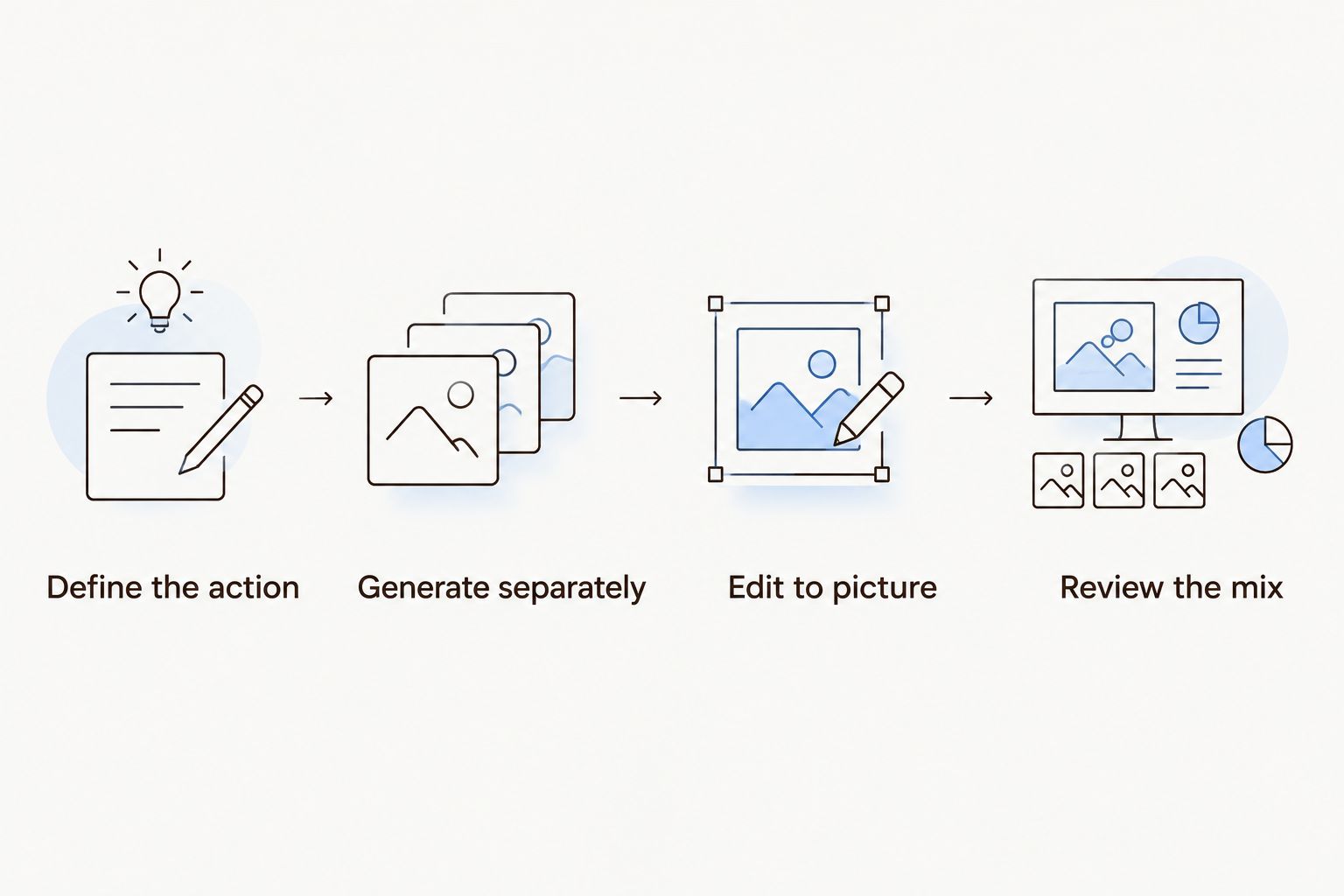
Generate separate elements so the final edit controls their placement.
Keep visual and audio review connected. Planegraph's Prism plans, checks, and retries work within reusable workflows; those capabilities do not establish that it can generate, import, or mix every audio format. Confirm the specific audio path before making it part of a client delivery process.
The same principle applies to its library of thousands of Meta ads, product-focused remixing, built-in avatars, pose guides, and reference content: these support content creation, but do not establish sound-generation capabilities. The guide to an AI video ad generator workflow covers the broader path from product input to finished ad.
Which AI sound effects generator should you choose?
Choose ElevenLabs if you want the most direct starting point for a written sound brief. Choose Adobe Firefly when vocal performance is central to communicating timing, Stable Audio for sustained atmosphere, and AudioGen for a deliberately technical local workflow.
For your 2026 selection, require a useful result in the actual edit before committing a campaign to any generator. A sound that works alone but fails beneath narration has not passed the relevant test.
FAQ
What's the best AI sound effects generator for video ads?
ElevenLabs is the default recommendation here for video ads built from written sound briefs. Adobe Firefly is the alternative when vocal guidance better communicates the intended rhythm or emphasis.
Can I generate sound effects from a text description?
Yes, ElevenLabs, Adobe Firefly, Stable Audio, and AudioGen support text-guided audio generation. Describe the source, action, surface, and environment rather than relying only on mood words.
Is Adobe Firefly better than ElevenLabs for sound effects?
Adobe Firefly is the better fit when you want to guide an effect with a vocal performance. ElevenLabs is the default recommendation here when your starting point is a written brief, not a performance.
Which generator should I use for background ambience?
Stable Audio is the atmospheric-texture pick in this shortlist. Evaluate its output beneath the actual narration and music, checking for distracting foreground events or unwanted musical material.
Can I use generated sound effects in client work?
Use generated sound effects in client work only after checking the applicable service and model terms. Confirm commercial use, delivery permissions, and any restrictions relevant to the specific project.
Does Planegraph include a dedicated AI sound effects generator?
The supplied Planegraph product information does not establish a dedicated AI sound effects generator. It documents content generation, a video timeline, a layered image canvas, AI-assisted changes, and reusable workflows.
Can I run an AI sound effects generator locally?
AudioGen through AudioCraft provides a route for local technical experimentation. Review setup requirements and the applicable model license before treating it as a production option.
One last thing
Approve the sound against the picture, not against the prompt. A technically accurate description can still produce an effect that pulls attention away from the product or obscures the spoken message.
Before delivery, play the finished ad once without watching it. If the sound suggests an action the video does not show, remove or revise that effect rather than adding another instruction to the prompt.